Map rendering: cutting corners #
I was drawing tile maps in Flash and found a cheap trick that improved the appearance of the maps, so I thought I'd share. Here's how I had been drawing the tile map:

In a bitmap-based graphics engine, you can smooth the edges of the tiles either by adding transition tiles (see this article or this article or this article) or by using a blending mask between adjacent tiles.
Flash, OpenGL, and DirectX are vector-based engines. The bitmap techniques still work, but there are new possibilities available. I'm drawing each square tile by filling a square polygon with a bitmap texture. The engine doesn't care that it's square; it works on any polygon. I'm taking advantage of this with what I call “vertex displacement”:

I look at the four tiles touching each vertex. If three of them are the same and the fourth is different, I move the vertex to expand the area of the three common tiles and shrink the area of the uncommon one. It's easier to see the effect with the polygon borders:

It turns out there are other fun things you can do with this trick. For example, a little bit of random noise on each vertex makes for a map that looks a little more hand drawn:

I've also used it to animate the boundary between the ocean and the beach. I added vertex displacement to my simple map generator; see the demo (Flash). Try changing the corner setting to adjust how much the corners get moved when three tiles are the same, and the random setting to adjust how much vertices get randomly moved. I have a separate demo (also Flash) to show the animated coastline.
The technique has its limitations. Terrain boundaries that don't fall on a 45° angle look wavy (see example). Some terrain types shouldn't meet in this way. And the biggest limitation is that it only applies when the terrain texture has no major features (such as trees, rocks, etc.). But it's a cheap enough trick that it's worth keeping in my toolbox.
Update: [2012-03-30] Also see Marching squares.
Labels: maps
Teleological vs. ontogenetic map generation #
Edit: The feedback from comments is that the names “teleological” and “ontogenetic” aren't good fits. I agree. There's an interpretation in which the terms work but there are also other ways to interpret them where it doesn't make sense. I had gotten the terms from the procedural content wiki, but in the future I'll avoid using these terms. I've changed the blog text to use “bottom up” and “top down”. Thanks for the feedback.
Long ago, I spent years working on the terrain generation for a game I worked on. I used earthquake faults, volcanoes, soil erosion, lava, river erosion, sediment deposition, water flow, weather simulation, vegetation (affected soil, which affected erosion), forest fires, floods, continental uplift, and other physical processes. This is the teleological approach bottom up approach to making maps.
To make good maps, I'd change parameters and run it to see if the maps looked good. I'd go back and change parameters again and again. Ideally I'd write a search/evolutionary algorithm that explored the parameter space. To do that I need to write code to determine whether a map will look to my eye, and I never did figure that out. I knew it when I saw it.
The other approach to map making is ontogenetic top down. Start with the structure you want to see, and make algorithms produce that directly and fill in the details. This is what I did with last year's simple map generation project. I had seen Perlin Noise, and thought, hm, that looks vaguely like a map — let's see how much work it takes to turn it into a map. Not much, it turns out!
For the past month I've been working on a new map generation project. I wanted island/continent maps with rivers, and Perlin Noise wasn't a good fit for that. I tried making random mountains come out of the ocean, and then using water flow algorithms to carve out rivers. I've been tweaking and testing, tweaking and testing, tweaking and testing, and finally realized that I'm back to using bottom up algorithms. It's incredibly addictive. It feels right: erosion, mountains, gravity, and all the other “realistic” things that form terrain.


The trouble is that I really don't need all of that. I'm working on 2D Flash games, and I don't need terrain; I need maps. It doesn't need to be completely realistic. It just has to be interesting. So I'm stepping back a bit and switching back to the top-down approach. I'm drawing some maps that I like, and then I'll find algorithms that generate maps like those, instead of modeling physical processes that produce realistic terrain. I think this will lead to better maps with less work.
Update: [2010-09-04] See my newer blog post to see the beginning of the new map generation project.
Varying game difficulty #
Contrast is commonly used for visuals and sometimes for music but you can also use it for game difficulty. The usual pattern in nature is slow rises and sharp falls.
- The stock market tends to slowly go up and occasionally drop dramatically.
- When you build a sand castle on the beach, you slowly make it larger, and then suddenly a wave destroys it all.
- Forests grow slowly, and once in a while a fire will wipe out large sections of forest.
- Stress slowly builds up in rock faults, and then an earthquake will suddenly release a large amount of stress.
In games we see this same pattern. Think of how many games you've seen that start off slow, build up, and then have a “boss” fight, followed by the relative calm of the next area. The difficulty or excitement might look a lot like a stock market plot.
One major difference between games and the patterns in nature is that you can't always predict the falls in nature. I've seen some games where a boss is unexpectedly followed by another boss, but usually you roughly know what's going to happen after a boss fight. In games where encounters are dynamically generated, it might be interesting for the encounters to follow a pattern like those seen in nature. More randomness with slow increases and sudden drops could make games more exciting.
Retro art: breaking the rules #
When you play a game with retro graphics, there are some things you expect. Pixelated graphics. Sprites. Limited color palette. At first glance, Realm of the Mad God has retro graphics like many other games:

However, Alex of Wild Shadow Studios put in several things that don't fit the usual retro graphics approach. The above screenshot shows that the world map and its pixels rotate with the player, while the trees, players, and monsters stay axis-aligned (like billboards in 3d games). Weapon projectiles move in any direction, not only the usual 4 or 8 that you might expect from a game on a tile grid.
Less apparent is the variable scale. The “pixels” aren't simply magnified by a fixed amount. Each object has its own scale, which you can see in this screenshot by comparing the trees:

Something that's easy to miss is that some effects have a shower of “pixels”. In this composite of three screenshots, you can see red “blood splatter” and some green remains of something that exploded (I think):
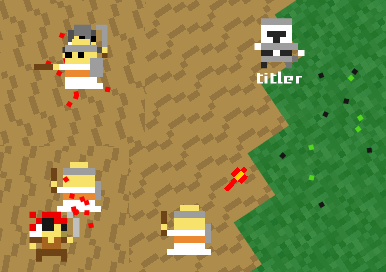
Also easy to miss is how the water effect breaks expectations of retro game art. The sprites themselves are pixelated, but the alignment doesn't match the map. With this, Alex produces water animation. Look closely at the sand and water boundary, and you'll see that the “pixels” don't match up:

One of the neater effects in this game is the 3d dungeon walls. The ground, tops of walls, and sides of walls are all rendered with pixel art. In this screenshot you can see one of the players is behind the wall:

I drew some examples of things that could be interesting but aren't actually in the game at this time: dissolve effects (teleportation?), shadows (to show height), shearing (to show motion), rotated body parts or weapons (for improved animation), and outlines (to improve contrast or show effects like damage or buffs):

The sprite art we got from Oryx is pixel art, but in a vector graphics engine there are lots of things you can do with the sprite art. For Realm of the Mad God, Alex played with rotation, scale, alignment, and 3d to produce some neat effects that you don't normally see in games with retro graphics.
Update: [2013-07-13] Also see this blog post about the 3d art style.
Labels: project
Simple map generation #
Update [2016] I have an updated interactive version of this technique here, with sample code.
My friends Alex and Rob at Wild Shadow Studios entered the TIG Assemblee competition. In the first 30 days, artists create art assets, and in the second 30 days, programmers create games with those assets. Alex and Rob decided to write an MMO in those 30 days. They asked me about generating game maps.
In the past I had generated outdoor terrain maps by using randomness, erosion, and water flow (see the Simblob Project). However there was a terrible trap in there. I spent years refining the terrain generation system, and far too little time working on combat and the game itself. I had fun, but I never finished that game.
Wary of my tendencies to work on one aspect of a game too much while neglecting everything else, I decided this time to do something simple. I started with Perlin Noise. I generated both a moisture map and an altitude map:

To ensure that some areas are dry and some areas are wet, I renormalized the moisture map to try to produce equal areas of every moisture level. I also renormalized the altitude map to produce far more flat and low lands than high altitudes, following a quadratic function. After renormalization every random map has a reasonable mix of land types.
From these I defined simple rules that assigned a vegetation. High altitudes are snowy mountaintops and low altitudes are ocean or beach. In between, the moisture determines how green or yellow the land is. Since most altitudes are not reflected in the map coloring, I added some shading so that it would be easier to see the mountains and valleys:

There were two things I wanted to add. The first was noise. I find noise to add to the visual appeal, and in this case it would also decrease the sharp boundaries between different terrain types. Compare this map to the original:

The second thing I wanted to add was wind. In many parts of the world, wind picks up moisture from the ocean and spreads it over the land. At mountains, much of this moisture is extracted from the wind and dropped as rain:

You can see this pattern in the United States, with winds out of the west dropping moisture in Oregon and California, passing over the Sierra Nevada mountains, leaving Utah and Arizona rather dry. In Australia, the winds come from the east, hit the Great Dividing Range, leaving the eastern coast wet and the interior of the continent dry. In South America, the winds come from the east but don't hit mountains until the Andes, so the rain falls over most of the continent, giving us the Amazon rainforest. I wanted the mountains in the game map to affect the moisture levels. I added a wind algorithm that spreads moisture from west to east and generated this map:
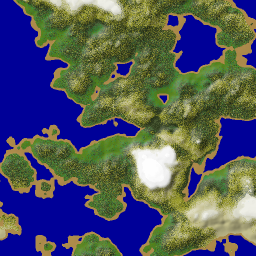
You can see that the dry areas in the northwest are now green, and the southeast, where the moisture is blocked by mountains, is dry. It seems more “realistic” but I think the players don't really notice such things.
In the demo app you can click on the minimap to see the zoomed area, change the number of wind algorithm iterations (then press Update), randomize the map seed (the Randomize button), or type in a random number seed and press Update. I find that 83980, 59695, 94400, 92697, 30628, 9146, 23896, 60489, 57078, 89680, 10377, 42612, and 29732 are seeds that produce decent maps. The demo differs a little bit from what we used in the game but the overall map shape and features are the same.
For Realm of the Mad God we exported the map and then made vegetation and monsters based on the terrain characterstics. The tree density was higher in jungles than on hills, rocks mostly were on mountains, and dead trees littered the deserts. Monsters too were terrain-specific at first, but they ended up spreading throughout the land. On top of the map we added random temple ruins and were hoping to make those areas special in some way, but ran out of time.
Looking back on this project, there were lots of things I did that don't really matter to the players. I tried to make the algorithms “scale independent” so that I could generate maps of different sizes and they'd end up with similar features, but in practice we only wanted maps of 2048x2048. The noise, which looks good in the overview map, looks awful when playing the game, so we ended up smoothing it out. I tried to make a two-step process that would generate the large scale features with one algorithm and the details with a different algorithm, and I never got that working well; I ended up just generating everything with the large scale algorithm. I had a river algorithm that carved out canyons, and I didn't get it working well enough in time for the game contest. I tried several ways to make the edges of the map into oceans (so that players would never reach the edge of the map) but none of them worked out, and players didn't seem to mind reaching the edge. The edges of the map never worked out right because bands of weirdness would form (you can see this in the demo). The simplest thing would've been to cut off the edges.
There were also lots of things I'd like to add, but probably shouldn't because I should move on to other projects. It would've been nice to create a map rating algorithm that could automatically pick out maps that look good (plenty of water, beach, mountains, variety, etc.). But for Realm of the Mad God we just looked at a bunch of maps and picked seed 72689. It was a pretty nice looking map, except the peninsula turned out to be a little frustrating for players, and we don't want the bosses to spawn on islands that players can't reach. For the expansion pack we'll probably just pick a few random seeds that look good and make maps from them. It would've been nice to automatically pick spawn points for players and monsters but those too were just placed manually. It would also be nice if there were some landmarks and regions with names so that the players could talk about where they were.
Try the game and see how different it feels to be exploring the map in the game than it does to look at it in the demo app. For example, the god monsters live on the mountains; it's much easier to see where these are on the map than to figure it out while playing the game. I think the 30 day time limit really helped keep me focused on things that would be useful for players. After the contest was over I found I was spending time on much less important things. I'm planning to stop working on the map generator for now, and only revisit it if there are specific features I need to add. The source is available under the MIT license (however the Oryx tileset is not licensed the same way so the version I put on github uses solid colors instead).
Flash 10: drawTriangles() disappointments #
I've been switching to Flash 10 for my game experiments. Flash 10 offers new graphics APIs, and opens up new approaches for how to deal with game objects. I wanted to compare these approaches:
-
(Flash 9) Use multiple
Spriteobjects for hierarchical layers, filters, rotation, and translation. It's convenient to have one or more Sprites per game object, and then move and rotate them without having to manage them manually. For vector drawing, I can usebeginFillandlineStylewith (Flash 10)drawPath. For bitmap (textured) drawing, I can usebeginBitmapFill, or there's a specialBitmapclass for rectangular bitmaps. -
(Flash 10) Manage my own list of objects, and then build up a vector of
IGraphicsDataobjects, and pass that toGraphics.drawGraphicsData. This puts the burden on me to handle translation and rotation, and I don't see a great way to add filters. Here too I can use eitherbeginFill+lineStyleorbeginBitmapFillfor vector or bitmap drawing. -
(Flash 10) Manage my own list of objects, build up a vector of vertices and another vector of texture coordinates, and use
Graphics.drawTriangles. I have to handle translation and rotation of the vertices, but Flash will handle the translation, rotation, and scaling of the textures.
Note that there's actually a lot more flexibility than just three
options. There are three ways to draw polygons (lineTo, drawPath,
or drawTriangles), two object management approaches (using
Sprite, or managing the list manually), and whether to defer
drawing using IGraphicsData. Which approach should I use for a game
like my spaceship
demo?
Convenience
One of the things I love about Flash is that drawing is pretty
convenient, especially with Sprite objects, bitmap handling,
translation/rotation, easy filters like drop shadow, and vector
drawing. For example:
var s:Sprite = new Sprite();
s.beginBitmapFill(texture, null, false, true);
s.drawPath
  (Vector.<int>([1, 2, 2, 2]),
   Vector.<Number>([100, 0, 164, 0, 164, 64, 100, 64]));
s.endFill();
To rotate or translate the game objects, set the s.x, s.y, and
s.rotation fields. When you need a new game object, instantiate a
Sprite and insert it into the hierachy; when you want to remove one,
remove the shape. Flash handles the rest.
With Flash 10, the IGraphicsData interface lets you store graphics
commands in objects, and then draw with them later. You can either
call commands similar to the Flash 9 API, or you can store graphics
data in a more direct form. Once you've assembled all the graphics
objects, you can draw them all using Graphics.drawGraphicsData.
v[0] = new GraphicsBitmapFill(texture, null, false, true);
v[1] = new GraphicsPath
   (Vector.<int>([1, 2, 2, 2]),
    Vector.<Number>([100, 0, 164, 0, 164, 64, 100, 64]));
v[2] = new GraphicsEndFill();
graphics.drawGraphicsData(v);
You can draw each of these to a separate Sprite, or you can assemble
them all into one big vector and make a single call to
Graphics.drawGraphicsData. The main value I think is to be able to
batch them up, so I decided to make a single call, but that means I
need to manage translation and rotation myself. Instead of creating
new graphics data objects, you can update them every frame. Each of
my game objects can keep a reference to where in the graphics data
array it is represented, and then when I want to update the game
object, I can change the corresponding GraphicsPath object. For
rotation, I need to edit the path and also the bitmap rotation in the
GraphicsBitmapFill object.
Adding and removing game objects is a little trickier. Either I can rebuild the entire vector every time, or I can build something similar to a memory allocator, so that I can reuse parts of the vector. I haven't yet decided how I'm going to handle this (my tests so far have a fixed number of game objects).
The Flash 10 Graphics.drawTriangles interface is somewhat
inconvenient when working with 2D data. It requires that all polygons
be decomposed into triangles (not hard to do but it's an extra
step). The function takes a list of vertices, a list of indices that
point into the vertex vector, and texture coordinates.
graphics.beginBitmapFill(texture, null, false, true);
graphics.drawTriangles
 (Vector.<Number>([100, 0, 164, 0, 164, 64, 100, 64]),
  Vector.<int>([0, 1, 2, 2, 3, 0]),
  Vector.<Number>([0, 0, 1, 0, 1, 1, 0, 1]));
graphics.endFill();
Here too I need to handle translation and rotation myself, by updating
the vector. However I don't need to rotate the bitmaps because
drawTriangles takes care of this for me. Adding and removing
objects is similar to the previous case, in that I need to handle it
myself.
Overall, the traditional API is most convenient, but deferring the
drawPath by putting it into a GraphicsDataPath is convenient
too. The drawTriangles interface is least convenient, except for not
needing to rotate bitmaps.
Performance
I've found that my intuition hasn't been a great guide for
understanding Flash performance. My intuition told me that approach 1
(Sprite objects) would be slower than approach 2 (global graphics
data list), and approach 3 (triangles) would be fastest of all.
I wrote a test program that drew 400–1000 square objects on the screen at once and moved them around. I also put in options for rotation (because many of the objects in the spaceship demo were rotating), use bitmap or vector graphics (I like noise in art and bitmaps seem to be the way to make that), using outlines for vector graphics (I like outlines!), and animating bitmaps.
My general conclusions, for this style of game:
- Vector graphics are faster than bitmap graphics (especially when rotation is involved), but that using outlines on the vector graphics slows them down, about as much as bitmaps do. Also, if the vector graphics have any additional complexity, the bitmaps end up being faster. Since I almost always want outlines or some other edge effect, bitmaps shouldn't cost me that much, and they'll give me a lot more options for adding details.
-
Using the separate
Spriteobjects is about the same speed as using a singleIGraphicsDatavector. Sprite objects are more convenient. However, once I want animation, theIGraphicsDataapproach shines: I can swap in alternative paths and bitmaps at no cost, whereas with drawing directly, I have to redraw to get animation (it's possible that I can create lots ofSpriteobjects and then swap them out but I haven't tried this). -
For consistent frame rates, it's best to minimize allocation, and reuse some objects. The
IGraphicsDataobjects, the vector of them, and the vectors fo vertex and index data all can be reused from frame to frame, with additional complexity to track where everything is. -
With the triangle API, I can put all my textures into one big bitmap, and then access them using texture coordinates. This allows me to make a single
drawTrianglescall. However, using hundreds of ofGraphicsBitmapFillandGraphicsDrawPathobjects is suprisingly faster than using a singledrawTrianglescall. I was unable to make the triangle approach faster.
The performance of drawTriangles (even when I used
GraphicsTrianglePath) was a disappointment. My thanks to Alex from Wild Shadow Studios for his help in understanding the APIs and performance.
Rendering
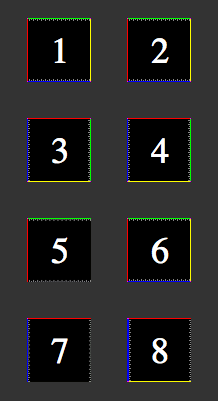
It wasn't enough for drawTriangles to be slower for this type of game. I've also had issues with the bitmap rendering. Here's a 64x64 test image drawn in several ways:
-
A
Bitmapobject. -
A polygon drawn with
beginBitmapFill. -
A
Bitmapobject rotated 90 degrees clockwise. -
A polygon drawn with
beginBitmapFill, rotated 90 degrees. -
Two triangles drawn with
drawTriangles, and u/v range from 0 to 1. - Same as 5, except u/v adjusted by 1/64.
- Same as 5, rotated 90 degrees.
- Same as 6, rotated 90 degrees.
Note that images 1 and 2 look the same. This is as it should be. If I believe the documentation, image 5 should look the same as 1 and 2. But it doesn't.
As far as I can tell, drawTriangles is assigning a u/v coordinate of
1.0 to be pixel 62 instead of pixel 63. If you look closely, you can
see the gray pixels are getting blurred (stretched). A “fix” for this
is in image 6, where I set the u/v coordinate to 1.0 + 1/64, so
that it picks pixel 63. With this hack, the image matches the
reference image 1.
Images 3 and 4 are the same as 1 and 2, but rotated 90 degrees clockwise. Images 7 and 8 are the same as 5 and 6, rotated 90 degrees clockwise. Notice that 7 is incorrect (it should match 3), but it's incorrect in a different way than 5. Instead of losing the yellow and blue edges, it loses the green and yellow edges. The hack in image 6, when applied to 8, fails. That means it's not as obvious as pixel 62 instead of 63; there must be a weirder issue that I don't understand.
These issues with drawTriangles rendering make it hard to recommend
for 2D graphics. I don't need everything to be exactly the same, but I
do plan to draw 1-pixel outlines around my sprites, and
drawTriangles can't preserve the outline. Even worse, as I rotate my
game's objects, the outlines will appear and disappear.
The drawTriangles API also has some weird effects when using Flash's
built in zoom function (right click and choose Zoom In). It also
doesn't seem to be happy when using bitmap fills with repeat set to
true. And it doesn't seem to handle texture scaling as well as the
regular APIs (it's possible they aren't using
mipmaps).
Conclusions
For both convenience and performance for games like my spaceship demo,
I think I should have every game object store some IGraphicsData
objects, and also store a vector of all of them. I had thought that
drawTriangles might be better, but it's both slower and less
convenient. It also doesn't look as good. I think I might take a look
at drawTriangles for 3D perspective graphics, or if I had lots of
triangle data, but for 2D or orthographic 3D, I think it's probably
not the best choice for me right now.
Labels: flash
Parallel World Simulation #
When playing long simulation/strategy games like SimCity, Roller Coaster Tycoon, or Civilization, I often have “what if” questions: what if I built an airport there? what if I invaded Albania? what if I switched to solar power? what if I built extra police stations?
My usual answer is to just keep wondering. However if I'm very motivated I can save the game, try something, save it again, go back to the first save game, try the other option, and then compare the results. It's rather tedious, so I don't do it much.
It might be interesting to bring the “what if” gameplay into the game itself, instead of being outside of it, as save games. Games like Chronotron and Braid allow you to go back and try something else, and even see past paths while you're playing through again. Halo 3 heatmaps aggregate information from a huge number of games. I think these ideas apply to simulation/strategy games too.
Imagine if you could “split” the timeline into two and watch parallel worlds evolve simultaneously:

If it's just a matter of running parallel worlds, I could do this by running the game twice, in two side by side windows. However if it was integrated into the game there's some potential for interesting gameplay:
The game could run two worlds all the time. Every 5 minutes the game could ask you which world is better, and then copy that world to both windows. You could run experiments but they're all limited to 5 minutes. You'd be able to learn by experimentation and then use that knowledge in the future.
The game could run one world most of the time, but then in a world-splitting event, split into two. In one world you'd be asked to destroy; in the other, to build. You'd gain bonus points for maximizing the difference between the worlds.
The game could let you play in one window and show in the other window the accumulated plays from your previous games on the same map, or perhaps from other people's games. Differences in play would be highlighted, and you'd gain points for novel play styles. In Halo, you might get a bonus for a sniper shot from a location where few people succeed making a sniper shot.
In a multiplayer setting, each player could play in her own world for a few minutes, and then the game would ask everyone to vote for their favorite world other than their own, and then that world would become the baseline for the next round of play. It might be possible to integrate this into a Facebook game that you play asynchronously with your friends.
If playing against a computer AI, it might be fair to let the computer player occasionally choose which world it prefers. The strategy would then be to set up a world that appears to give you a disadvantage without actually doing so. The Chess equivalent would be to intentionally sacrifice a rook in order to set up a winning move.
I'd love to see games explictly tackle parallel worlds, individually and in aggregate.
Storytelling with Comics #
In my post about drawing ninjas, I mentioned that I had an idea for blending comic books and games, and I was trying to figure out where that idea came from. Most of the ideas I have are combinations of other ideas, and occasionally they're an idea I saw a long time ago, absorbed, completely forgot about, and then had it surface again. I think this idea was sparked from a combination of things:
After reading Scott McCloud's Understanding Comics, the comparison of time and space stuck in my head. Games, videos, and audio present a sequences temporally, but books and comics present those temporal sequences by laying them out spatially. Are there games that use the spatial layout of time?
I played Passage, a game that represents time as a spatial dimension.
I played A Tale in the Desert, a massively multiplayer game in which a story unfolds from the collective actions of players. I had also played World of Warcraft, in which all the regular monsters get reset too often to make a lasting difference, but even there I saw story-worthy events (huge raids on cities, large social activities). But how are these recorded?
I got a new computer, which came with a neat little program called Comic Life. This application makes it easy to create comic strips and add thought/speech bubbles.
I played Oblivion, in which I'm playing through a story. The quest NPCs know what part of the story I'm on, and can react appropriately. But it's a big open world and I can do lots of things, including side quests for various guilds. Unfortunately the tale of what I actually did isn't anywhere; what's encoded in the game is what I'm supposed to do on the main quest.
The Sims and Spore are also storytelling games but the stories I read were outside the game itself. In strategy games, I want to see the history of battles on the map. In adventure games, I want to see the history of my progress, not only successes but also failures. Sports games aren't just about who won but about the great events during the games. In Chess I often want to see just the key moves that turned the game. Some of these games have timelines or replays or screenshots, which help with what I'm looking for, but they don't go far enough.
Comic books seem like a nice medium for recording history. At the extreme, I could imagine using the comic book format for both the history and the “live” game. The rightmost panel would be the game, and the other panels would show what you've done:

As you play, “screenshots” of the significant events turn into static panels, which scroll off to the left. At the end of each chapter/level you can go back and see the history of what you did. At the end of the game you can go back to see the entire game history, and then if you want, you would annotate it (with speech bubbles etc.) and share it with friends. You could click on those panels to show a replay of that event. The are plenty of open questions here: what are the most significant events? What screenshot do you pick to convey the event? How many events do you want to capture? Should you ask the player to replay the event and pick the best point? Does this format give people enough context to understand the story? Will anyone want to share these stories?
It was with that idea in mind that I started working on the ninja animation. However, I lost interest in that (I seem to lose interest in lots of things I start) and don't know if I will ever return to it. I still think keeping history and stories hasn't been explored enough in games, and in just about every game I play, I can think of features that would help with history/stories. Storage has become very cheap; let's record a lot more.
Update: [2012-04-02] See Storyteller, an interesting experimental game that's based on directly manipulating comic strips to build a story.
Update: [2017-03-08] Final Fantasy XV uses photos of significant events to tell a story.
Labels: ideas
Noise in game art #
If you look at the artwork in old 2D 8-bit games, you see a lot of noise and dithering in the hand-drawn bitmap art. For an example, take a look at the grass or concrete in this Transport Tycoon screenshot:

When the gaming world moved to 3D 32-bit vector art, we lost some of that level of detail. We got lots of smooth areas. Eventually we mostly got the detail back by applying textures to the polgons. However, it often looks worse to me than the old hand-drawn art.
With my Flash experiments, I've been playing with 2D procedural vector art, and I've been trying to figure out how to make it look nicer without drawing textures by hand. The simplest thing I found has been to apply noise to the art. On the left is some terrain without noise and on the right is some with noise:


I like the noisy version much better.
The noise layer is fairly easy to apply; I use BitmapData.noise() to
generate it, and then use BlendMode.ADD to add it to the original layer.
  var noiseTexture:BitmapData = new BitmapData(128, 128);
  noiseTexture.noise(Math.round(Math.random()*65536),
                     0, 8, 7, true);
  var noise:Shape = new Shape();
  noise.graphics.beginBitmapFill(noiseTexture);
  noise.graphics.drawRect(0, 0, size, size);
  noise.graphics.endFill();
  layer.draw(noise, null, null, BlendMode.ADD);
  noiseTexture.dispose();
It's nice in that it inherits the color already there; the noise doesn't impose its own colors. However, this only works nicely on my background terrain, and it feels somewhat slow on my low-end machine.
For foreground sprites, the noise layer doesn't move when those
sprites move or rotate. An alternative would be to draw the noise on
top of my sprites, using Graphics.beginBitmapFill(), but that would
require that I have a way to compute the outline of my procedural art,
so that I can draw the noise on top as a polygon. Another alternative
would be to use bitmap fills for every polygon, but that requires that
I have a noise bitmap for each color. And yet another alternative is
to draw every polygon twice, once for the color and once for the
noise.
With Flash 10 I had hoped that the pixel
shaders would allow
me to apply noise to anything. I played around with them a bit. The shader
receives the output coordinates in a function outCoord(), and can
compute a color for that location. It can optionally include
parameters (like a noise bitmap). The big problem is that the output
coordinates are in screen space. This means that when the sprite
moves or rotates, or if you zoom in, the noise would stay fixed
relative to the screen. I tried both using shaders for fills and
shaders for filters, and neither gave me what I wanted.
That's a serious problem for my use. To address this problem, I can pass in additional parameters like rotation and offset. However, I have to re-fill the shape every time I change the shader parameters. Even worse, the pixel shader is recompiled every time you fill.
So it looks like pixel shaders in Flash 10 just don't do what I want. I want a way to get the pixel's location in the sprite's coordinate system, after transforms are applied, but instead I only get the screen's coordinate system.
I think my best bet for performance is to not apply noise to vector backgrounds (applying noise to a bitmap won't impact performance). This will make me sad but smoothness matters a great deal. I should also try using tiles to see if that is any faster. For foreground objects, it's probably not too bad to draw everything twice, but I'll have to test this. It may not matter if I switch to bitmap sprites eventually; they'd let me draw a lot more details.
Switching to Flash 10 #
On this blog you can see some of the experiments I've been playing with. In 2004, I started looking at Flash, mostly because I'd be able to share my experiments on the web. But at the time, Flash wasn't as free or accessible, and I switched to Java. Dissatisfied with Java, I took a look at Flash again, and started writing Flash 8 code. Two years ago I switched from Flash 8 to Flash 9. Flash 9's language (Actionscript 3) is much nicer than Flash 8's language (Actionscript 2). It's a modern programming language, with classes, objects, closures, recursion, XML, JSON, etc., and was tracking ECMAscript until the Javascript folk changed direction. Flash 9's graphics libraries are nicer than Flash 8's. It supports a tree of layers, each with its own rotation, scaling, alpha transparency, shadows, and other effects.
Flash 10 uses the same language as Flash 9. Its libraries have lots more features, especially in the graphics system. There's now a low-level graphics API that offers partial 3D, higher performance, and pixel shaders. I was slow to move to Flash 9 in part because the adoption of Flash 9 was slow. It looks like Flash now has auto-updating, and Flash 10 is being installed much more widely. I'm switching all my current projects to Flash 10.
For Flash 10 I'm using the free Flex 3.3 SDK and the Flex
3.3 docs (online or download). The
SDK comes with a command line compiler, mxmlc, that I run
with mxmlc -target-player 10 on the “main” program, and
that will also compile anything else that is used by the main
class. If you want a tutorial for using mxmlc, see
senoular's mxmlc beginner
guide.
Flex also comes with a compilation shell, fcsh, that lets
you keep the compiler in memory to avoid the 2 seconds to start it up
every time you want to recompile. I wrote a wrapper around this so
that whenever I save something in Emacs, it automatically recompiles.
That way, my development cycle is: edit, save, and reload in the
browser. It's quite nice to have a fast cycle.
I haven't played much with the Flash 10 library additions, but the first thing I used was the bitmap line support. I'm using it to draw dashed lines as striped lane dividers. I plan to read about the new library features, but not try them until I find a possible use for them in my projects.
Update: [2012-02] [2010-03] Flex 4 is out, and includes updated documentation, and downloadable documentation. Like Flex 3, it targets Flash 10 but can also be used for earlier versions of Flash.
Update: [2013-04] This seems to be the new command line Actionscript compiler, for Flash 11 / Stage3D / AIR.
Labels: flash , programming