Playing Oblivion #
In case you've been wondering why this blog (and progress on my game) has been quiet lately, it's because I've been playing The Elder Scrolls IV: Oblivion. It's a fun game, in part because the NPCs do their own thing, and it's fun to watch them.
Tonight I was running north along one of the main roads, and a bandit jumped out to rob me. He jumped a bit too late, for I kept running with a bandit on my tail. I met another bandit, who also started chasing me. I then met a third bandit and continued to run. I then saw two of them turn and start chasing a woman on horseback. She delivers the newspaper daily to all the cities. She screams and starts to flee downhill. I turn around and start chasing the bandits, not because I want to save her, but because I want to watch the chase scene. After chasing her down the hill to the bay, they noticed me and started chasing me instead. She fled to the south and I went to the north. I decided to escape by swimming across the bay. To my amazement, they started swimming too. I have a magic item that doesn't require me to breathe underwater, so I went underwater and hoped they would drown. They didn't. They periodically came up for air. As I reached the other side of the bay, I looked down and saw the two of them coming up for air, then diving again. I wasn't able to escape.
I decided to turn east and head for a fort. Many forts contain monsters, and these monsters often fight humans, including bandits. Not all of my enemies are friendly towards one another. At the fort was a troll, a mudcrab, and a bear. I jumped up to a high perch and watched the two bandits defeat the three creatures. I then decided to lead them to a nearby cave. Along the way the bandits killed a wolf, and at the cave they met a minotaur and an ogre. In Oblivion, ogres are incredibly strong. It was here that I expected the bandits to meet their end. Instead, they fled! They swam across the bay, out of my trap.
I chased the bandits across the bay. I lost one of them, but saw the other one run up a hill. I chased him for a while but eventually he got away. I went back across the bay to the minotaur and ogre, and led them to a nearby goblin cave. It took three goblins to kill them. Now I have one goblin remaining. I took him to another cave, inhabited by a rival tribe of goblins. Four goblins from the rival tribe killed the one goblin I led there. I now had four goblins chasing me. So I took them back to the first goblin tribe's cave. I kept running back and forth, not actually fighting, but just leading goblins to each others' caves, and the hordes wiped each other out.
Playing this way is amusing.
Having played for 130 hours, I'm about halfway through Oblivion. It's an interesting game for a game programmer to play. You can guess what techniques they used for their AI, and then run experiments to see what happens. I'm probably not playing the way they meant the game to be played.
Labels: review
Do people really want innovation in games? #
People seem to complain that games (and movies) are all the same—that there isn't enough innovation. I suspect though that people don't really want innovation. Guitar Hero is innovative. Wii is innovative (watch the Wii video from E3). But if you enjoyed some game, don't you want more like it? Or would you rather take your chances with something random?
In the field of machine learning, there is the notion of exploration vs. exploitation. As you learn things, you want to take advantage of what you've learned. If you never exploit what you've learned, why bother learning it? Why bother learning to read if you're never going to read? However you can't only spend your time doing what you know. You also want to spend some of your time exploring new things. Otherwise you may not discover something better than what you know. 100% exploitation is a mediocre strategy. 100% exploration is a bad strategy. You really want some of each.
In game development, movies, books, etc., it would be a shame if there were no sequels or games similar to existing games. That would mean that if someone discovers something good, we never do that again. On the other hand we don't want only sequels. I think games like Guitar Hero, Gish, The Sims, Everquest, and Puzzle Pirates demonstrate that there is innovation out there. Some people are arguing that there isn't enough. Others are arguing that there shouldn't ever be sequels. It's hard to know what the “right” amount is. I do believe that the way the free market works, there will be slightly less innovation than is optimal. It's not zero though. And I don't believe that you can force the market to innovate more. Ironically, a market with lots of small independent game companies is likely to produce less innovative games than a market with behemoths like EA. But that's a story for another day.
I find that of the games I've gotten recently (Black and White 2, The Movies, Guild Wars, Oblivion), I've enjoyed the innovative games less. I think that's because the sequels have more refinement in them, and that makes them better than the innovative games, which haven't been tried out on a large scale and don't yet have the feedback needed for improvement. I'm trying to spend around 10-20% of my time playing innovative games, in part because I like to study them as a game programmer, but also because I want to spend some of my time exploring new things.
Innovation isn't dead. It just produces lots of junk, which is what it should do. If all innovative games are good, people aren't experimenting enough. Sequels aren't bad. If we never had sequels, we'd never be able to polish the rough gems found in the innovative games.
Labels: design
Prediction, Chaos, and Order #
When you play a game, can you predict what's going to happen? I think being able to predict everything makes the game boring. Being able to predict nothing makes winning unrewarding. It becomes a game of chance rather than a game of skill. It's games in between that I'm interested in.
I want skill to be important, so that winning is rewarding, but make each instance of the game different, so that you can play repeatedly. How can you make the game somewhat unpredictable?
- Multiplayer. If you add other humans, and humans are hard to predict, then we can't predict the outcome of the game. I think however that this isn't sufficient. If the opponent is good and the game predictable, you can predict what the opponent should do. Tic-Tac-Toe is an example of a game that's multiplayer but boring.
- Complexity. In some games, the game world is so complex that a human cannot accurately predict what will happen, even if everything were known. Chess is an example of a multiplayer game in which the entire game board is known, but it is not possible for a human to determine the best move.
- Randomness. If some aspects of the game are random (for example, the roll of the dice), the game will be different each time. If there's too much randomness, then the winner is essentially random. If there's too little, then each game will essentially be the same. But if you get it just right, then the player's skill demonstrates how he reacts to the game. There's also randomness in physical games. For example, when playing golf there's some randomness in where the ball goes, just from unpredictable variation in the stroke, and factors like air density and wind.
- Information Hiding. Some information about the game world can be hidden from the player, and the player's skill can be used to infer aspects of the hidden information. You can hide the initial game world (for example, the cards initially dealt to each player), the opponent's moves (for example, the cards discarded by an opponent), or the result of randomness (for example, the cards drawn from a shuffled deck during the game).
Many games combine more than one of these. For example, Chess combines complexity and multiplayer. Poker combines information hiding, multiplayer, and randomness. Civilization combines all four.
When playing a game that involves randomness, it is important to note that skill is not the only factor; “luck” matters as well. In the NCAA tournaments starting this week, as with all sports games, you cannot conclude that the winner is a better player. You can only conclude that the winner is likely to be a better player. That's why rematches are useful—they let you be more confident in who's better.
My transportation game involves randomness and complexity, and I am undecided about information hiding. It's a single player game, and I am not planning multiplayer. After all, I will be the only player.
Labels: design
Transportation game, models #
I'm trying to use stocks and flows to create a model for my transportation game. Stocks correspond to nouns and flows correspond to verbs. At first I thought businesses would be stocks and the transportation of goods would correspond to flows. But I could also see the businesses as flows (since they consume and produce things) and the cargo areas and trucks as the stocks. Or maybe both trucks and businesses are flows, and only cargo areas (loading docks) and warehouses are stocks. Or maybe the cargo itself is the stock.
When it comes to a game, the player's decisions (and the AI's decisions) can directly affect flows, but not stocks. You can change the rate of production in Warcraft by hiring more peons, researching technology, etc. Production of gold is a flow. You do not directly change the amount of gold you have (except by buying something, but I think that's an instantaneous flow). Gold is a stock. There's no decision to be made with a stock—it just exists. There is a decision to be made with each flow, because you can throttle it back from its maximum. There are other decisions to make as well, but the basic resource management decisions (for gold, wood, soldiers, etc.) are about flows, not stocks.
In my game, the player controls the movement of trucks and the AI controls the businesses. The decisions are based partly on how much of each resource is available. I'm planning to treat trucks as stocks and the loading/unloading of them as flows. Businesses will be flows, but their cargo areas will be stocks.
The transfer of cargo is not enough to make an interesting game. The player will also need to make decisions about infrastructure and placement of transportation systems. The actual loading and unloading of trucks is boring; it's likely that an AI agent, acting on behalf of the player, will make those decisions. I still don't have a clear idea of where I'm going with this game, but it's already led me to some interesting topics (operations reseach, system dynamics, supply chain management).
Labels: project
Impolite game: Spellforce 2 #
I no longer play Guild Wars, Black and White 2, or The Movies, so I've been looking for another game to buy. Battle for Middle Earth 2 and Spellforce 2 both looked interesting, so I downloaded their demos.
Spellforce 2 won't start the demo unless I install StarForce. What's the point of copy protecting a demo? And worse, StarForce is awful and I am not buying games with it. So Spellforce 2's demo goes into the recycle bin, and I'm trying out Battle for Middle Earth 2, which looks and sounds nice. It seems to use SafeDisc, which is perhaps not as bad as StarForce, but still annoying. It also has lots of splash screens that can't be aborted by pressing Esc or Enter or Space or by clicking the mouse. Why do games tell you to use NVidia/ATI and Intel/AMD? Do they really want to tell 75% of their audience that they've chosen badly? I haven't found a major commercial game as friendly as Guild Wars. Fortunately Guild Wars is about to release an expansion pack, so perhaps I'll wait for that.
Labels: review
Transportation game, basic objects #
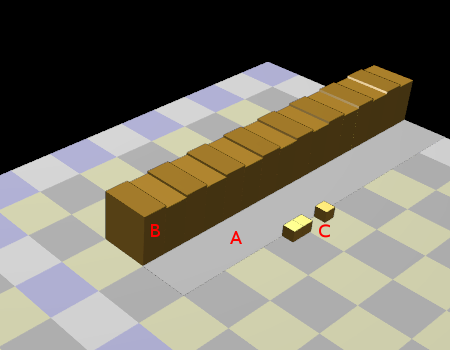
I wanted to start with something simple for my transportation game. I want to explore the transportation of goods between businesses. I created a simple model:
- Business. Each business (labeled B in the diagram) can consume and produce items. For example, a steel mill consumes iron and produces steel. Some businesses only consume; some only produce. In my initial implementation, there is only one producer (a dock, where goods are imported from other areas) and one consumer (a retail store, where goods are bought).
- Cargo. The goods and materials are put into containers (crates, boxes, pallets, etc.) and the containers (labeled C in the diagram) are moved around the game world. Each container represents some amount of material or goods. In my initial implementation, there is only one type of cargo (“goods”) and only one size of container.
- Loading Areas. A business may not consume goods as soon as they arrive, and it may produce goods that are not immediately picked up. Loading areas (labeled A in the diagram) are a place for cargo to be stored.
I haven't yet chosen good terminology. Is it business or building? Is it cargo or container or goods? Consistent use of terminology will help in picking good names in the code. I want to choose names that are general enough to cover a wide variety of cases.
I think the model has some nice properties. It's very general, so it can apply to many different kinds of businesses. For example, a warehouse is a business that produces the same thing it consumes, and consists almost entirely of loading areas. The loading areas make it easy for the player to see when the transportation system is working too fast or too slow. However, there are a lot of unanswered questions at this point. Does each type of cargo require its own loading area? Does a business buy from just anyone or does it choose its suppliers? How are perishable goods represented? I will leave these questions for later and focus on the simple case: one producer, one supplier, one type of cargo.
Labels: project
Selecting objects in a 3d world #
Once I can move around in my game world, the next step is to interact with objects. I need to determine what object, if any, the mouse points at. There are three general approaches I know of:
- OpenGL picking. In OpenGL, you can use “selection mode” to identify which object the mouse points at. This involves assigning a number to each object using
glPushName/glPopName, then re-rendering the portion of the scene very close to the mouse pointer usinggluPickMatrixandglRenderMode(GL_SELECT), then looking at the object numbers that were rendered by reading from theglSelectBufferarray. In theory, you can re-render using exactly the same rendering code. In practice, you want to skip expensive operations like setting up textures, drawing outlines, using shaders, etc. Once you determine what object was drawn at that location, you still don't know exactly where the mouse points. I used this approach in SimBlob 2 and was somewhat unhappy with it. It's easy but it's sort of ugly. - Raycasting. The mouse pointer is a 2d location, and it translates into a ray in 3d space. In theory, the ray begins at the camera and goes back into the distance. In practice, the ray begins at the near plane of the viewing frustum and goes through the far plane. You can use
gluUnProjectto determine where the ray is; usez==0for the near plane andz==1for the far plane. Raycasting works well if you have kept the geometry of all of your objects; it's more of a pain if you generate it on the fly (as I did in SimBlob 2). You have to implement ray-object intersection for all of your object primitives (triangles, boxes, etc.), and it helps if you have a scene graph or spatial partitioning tree so that you don't have to intersect the ray with every object in the world. Once you perform the intersection, the closest hit tells you not only which object is involved but where on that object the mouse points. This approach requires the most work but it's the most reliable and has the best accuracy. - Depth buffer. Just about everyone is using the depth buffer in a 3d program. Once you render your scene, OpenGL has the depth (z) value at every pixel. You can ask for the
zvalue withglReadPixels. You can then compute the world space location of the mouse pointer usinggluUnProjectand thezvalue you just read. The final step is to determine what object is at that location. This approach is easy, but the depth buffer doesn't have much precision, the precision varies among graphics cards, and the depth buffer is altered when using polygon offsets, so it's not reliable. Another disadvantage is that translucent objects get in the way because they show up in the depth buffer.
I started out using the depth buffer approach, but I've switched to raycasting. The depth buffer has too little precision to give me the accuracy I wanted. I also wanted to distinguish between game objects (selectable) and translucent annotations (not selectable), and the depth buffer doesn't give me that level of control.
Labels: programming , project
Navigating a 3d world #
As I implemented navigation in my 3d world, I had a set of choices to make about how navigation should work. There's a camera with some position (x, y, z) pointing in some direction (θ, ρ) and some type of lens (field of view). That gives me 6 variables for the player to control, and that seems like too many.
- Scrolling (Panning). If you scroll “up”, what direction does the document go? In most GUI systems, the document goes down. Try it out in your web browser. As you drag the scroll bar up, the document moves down. However, some types of documents move the opposite way. Try visiting Google Maps and drag the map around. As you drag the mouse up, the document (map) moves up. The difference is in what you are dragging. In most applications (including web browsers), you are dragging the view. If you move the view up, you move towards the top of the document, which means the document moves down. If however you're dragging the document, it goes in the other direction. I have been playing Black and White 2 lately, and in it you drag the map. I initially chose to drag the document (map), but then changed it to dragging the view (camera).
- Scroll controls position or velocity. If you drag the mouse pointer, does it control the position of the scrolling or the speed? If you have Firefox or Opera, try the autoscroll feature and compare it to using the scrollbar. Autoscroll controls the speed; the scrollbar controls the position. The advantage of controlling the position is that it feels easy to control, especially when combined with dragging the document. The advantage of controlling the velocity is that you can move around the entire game world without repeatedly lifting the mouse, dragging across the screen, then lifting the mouse again. Some applications offer both. Google Earth and some OpenGL demos let you drag to control the position, but if you let go while still dragging, it sets the velocity. I find this very hard to control. I chose to make mouse dragging control only the velocity.
- Rotation. The camera direction has two degrees of freedom, whether you use angles or vectors, so you need two controls for full control of it. Some games restrict the camera, and thus may only need one or zero controls. I chose to fully allow rotation around the z axis and offer minimal control over rotation of the other axis (looking up and down). Given rotation, there is a choice of rotation point. Black and White 2 is unusual in that it rotates and zooms around the position you point to with the mouse. It gives more control but I found it disorienting. I instead chose to rotate around the center of the screen. The best rotation point is likely to be something closer to the camera than what I've chosen, but rotating around the center of the screen is easier to implement.
- Type of zoom. There are two approaches to zooming. You can change the lens. A “telephoto lens” has a small field of view and corresponds to “zoomed in”; a “wide-angle lens” has a large field of view and corresponds to “zoomed out”. (I'm being a bit imprecise; see this article and the comments if you want the details.) You can also change the position. Moving the camera close to the subject makes it “zoomed in”; moving it far from the subject makes it “zoomed out”. These two approaches are not equivalent. I chose to keep the lens fixed and move the camera around for zooming. Dragging the mouse up or down moves the camera up or down, which also rotates the view somewhat. When the camera is up high, it's rotated to point top-down; when it's near the ground, it's rotated to point forwards.
I started with 6 variables to control. Dragging the mouse occurs in 2 dimensions, allowing control of 2 variables per button or modifier. For a typical strategy game, god game, or city builder, the player can move around the entire map, so you probably want to control camera position (2 or 3 variables), camera direction (1 or 2 variables), and zoom (1 variable). For a first person shooter, the camera must remain at the player's location, so you'd probably want to control camera rotation (2 variables) and zoom (1 variable). For a third person RPG, you probably want camera rotation (1 variable) and zoom (1 variable).
My game is a simulation, so I want to move the camera in at least 2 dimensions, plus 1 variable for rotation and 1 for zooming. I don't allow changing the camera lens, so instead zooming involves changing both the camera height and rotation. That leaves me 4 variables to control with mouse drags. I'm reserving the left mouse button for interacting with game objects. I've chosen to assign the right button to scrolling (2 variables); and the middle button to rotation (1 variable) and zooming (1 variable). These mouse dragging rules make the mouse dragging always control the camera, not the map. They're simple and self consistent. They aren't perfect, but I'm happy with them so far.
Labels: programming , project
Rough sketch for a transportation game #
As I thought about the things I learned working on the SimBlob project, I realized that I hadn't explored a lot of the topics I originally wanted to explore. I spent my time playing with environmental simulation (water, weather, fires, dams, floods, vegetation, etc.) and never got to anything else. I decided to start over and focus on a few topics in a simple game. In my new project I'm going to explore economic simulation and transportation networks. I have a rough idea of where I'm going, but as I learn things, I expect that the design will change.
There are lots of transportation/economic/city games out there: Railroad Tycoon, Transport Tycoon, SimCity, Simutrans, Locomotion, Transport Giant, Traffic Giant, Industry Giant, LinCity, A-Train, Capitalism, The Settlers, Mobility, and probably many more. There are also many projects in development (some abandoned): Transport Empire, OpenCity, 3DTT, Widelands, Zugspiel, and of course, BlobCity.
My intent is not to clone one of those games, but instead to explore economic and transportation models by writing a game. Throughout history, transportation has affected the development of business and vice versa. The Phoenicians used ships to transport goods, and built a trading empire that lasted a thousand years. The Romans built roads and aqueducts. The Arab empire was based on trade between the east and the west, using caravans and ships. In the United States, railroads greatly altered the flow of goods and linked the west and east coasts. The Panama Canal and Suez Canal helped goods flow by ship. In the late 20th century, advances in transportation made possible the rise of FedEx and the flow of cheap goods from the Asia Pacific region. The use of standard shipping containers linked ship, rail, and truck transportation systems together. None of the games I've tried explore all of these ideas. Have you ever seen a crossdock or Less-than-Truckload shipping in a computer game? I've been fascinated with these topics and would like to explore them in a simulation game.
The basic idea of the game is that businesses trade with each other using an inefficient transportation network (such as people carrying boxes on foot), and the player can offer better forms of transportation. As transportation gets cheaper, the businesses make more money, so they expand. The number of businesses goes down, but the size of the businesses goes up. Increased volume and a change in business structure means the player has to adapt. The player has to choose among hand delivery, hand trucks, carriages, gasoline powered trucks, large trucks (semi-trailer trucks), rail, and ships. As volume goes up, the basic unit being transported gets larger as well, from individual products to boxes to pallets to containers. Upgrading too early is wasteful; upgrading too late is inefficient. Reliable transportation infrastructure can affect how businesses and cities develop. The player has to choose areas of the world to develop, structures to use for each type of good (central distribution, multiple hubs, point to point), sharing among multiple types of goods, temporary storage (warehouses), and modes of transport. As times change, the player has to monitor the efficiency, health, and profitability of the networks and choose which to upgrade, replace, or dismantle. I'm really not sure whether such a game would be fun for anyone but me. I tend to like logistics in games.
Given that game programming is just a hobby of mine (and I have plenty of other hobbies), I think the basic idea is too ambitious for me to attempt at first. Instead I'll design a simpler game and work on that. I've found in the past that if I take big steps, I'm more likely to fall, so I've learned to take small steps. I also don't want to spend forever on this game; I have plenty of other topics I want to explore. Once I've decided my next steps, I'll post them here.
Getting started, 3d world #
I'm starting a new game project, not because I think I'll write a cool game, but because I want to explore some ideas (economic simulation and transportation networks). I decided to use 3d graphics for two reasons:
- I want to learn more 3d programming. I've played with GL and OpenGL for a long time but I've never been completely comfortable in a 3d world. Each time I write an OpenGL program, I learn more about 3d graphics programming.
- Ease of programming. I believe it's easier to work in a 3d graphics system than in a 2d graphics system, until you get to the point where you want artwork. Since I don't expect to have nice artwork, I think 3d graphics will be easier. The graphics card handles things like isometric views, filling polygons, gradients, lighting, and textures. There are simple approaches for mapping screen coordinates to game coordinates and back, because the graphics card does the mapping. It's very simple to alter the appearance of objects for highlighting and mouse manipulation; you can just change the color or lighting. And the CPU is freed up for doing things like AI and world simulation.
I started out writing a simple GLUT program that set up a window and the camera, then drew a simple triangle. Once I got it running, I added stub code for the standard set of GLUT callbacks (mouse handler, keyboard handler, window resize handler). I changed the scene from a simple triangle to a square grid, added a mouse handler that highlighted the current square, and made the right mouse button drag the camera around. I then started refactoring the simple GLUT program into modules (mouse, camera, timer, vector algebra, etc.), added simple lighting, improved the camera dragging code, and added some cubes to the scene. I implemented collision detection between rays and boxes and then used that to highlight the object the mouse pointed to.
Working a little bit each night, I've spent a week on all of this. It's all graphics code and no real game code. Have I gotten stuck in a “tar pit”? No, although there are some things like lighting and gradients that are dangerous to spend too much time on, I think this initial time setting up the 3d world will be well worth it later on.
When I work with programming languages, I really appreciate having an interactive prompt. Lisp, Scheme, and Python are much more approachable because they have this. I can just start Python and inspect variables, create and change objects, explore, test, etc., all without having to go back to my code and insert new commands. You can also do this with interactive development environments (like Smalltalk's). I want something similar at the game level, where I can move around freely and click on an object to see all of its properties. I'd like to create, destroy, and modify objects as the game is running. I don't expect to build all of this at the very beginning, but having an infrastructure that exposes all the game objects in a uniform way will help me later on. How much do I really need at this point though?
Two of the approaches used to uniformly represent 3d objects are scene graphs and spatial partitioning (BSP trees, octtrees, bounding box trees, etc.). Scene graphs are useful for representing changes to lighting, scale, rotation, translation, color, material, textures, and objects with shared components. For example, instead of representing a complex soldier 3d model for each soldier object, you'd store it once and have it occur multiple times in the scene graph, each time with a different rotation and position. Spatial partitioning is useful for collision detection. For example, instead of testing every vehicle against every other vehicle to see if any of them collided, you would partition space into smaller areas and only test vehicles if they are in the same part of the game world. Both scene graphs and spatial partitioning can also be used to render only the objects that are visible in the scene; this can greatly speed up the rendering.
I've decided that the number of objects in my game is small at the moment and is likely to stay small for some time, so I will use the brute force approach. I'll test against every object for collision detection, I'll render every object and let the graphics card figure it out, and I'll replicate geometry (vertices, colors, normals, etc.) for each object. At some point I may need scene graphs and spatial partitioning, and I'll go back and add them in. Code that depends on whether I have a list or a scene graph should remain as isolated as possible, so that I can switch later.
Having written a minimal 3d world rendering system, I'm ready to go back to designing more of the game. While exploring new ideas, I tend to alternate between design and implementation. What I learn from implementation feeds back into the next round of design, and working on the design lets me step back from the implementation to see the big picture.
All the code for this game is open source, under the MIT license.
Labels: project