Auction Houses #
(image from NecroRogIcon on Flickr), CC BY 2.0

I used to play the auction house part of World of Warcraft. I noticed that when I want something as a trader, I'm often willing to wait the 24-48 hours with a “bid” offer. But when I'm crafting or just wanting to play, I'm less patient, and I prefer the immediate gratification of the “buyout” offer. When I was selling, I'd just set the bid to be slightly below the buyout, but I'd also have multiple overlapping offers at different prices, different time periods, and different stack sizes.
There's an asymmetry between the buyer and seller in WoW's auction house. Sellers don't need immediate gratification. Buyers do. The “buyout” feature is used a lot. There's no corresponding “sell immediately” feature.
This isn't a new observation. EBay started as an auction site but now has a lot of traffic using “buy it now”. The difference is that in WoW, buying something is even more immediate — you walk to your mailbox and have a shiny new sword waiting for you — with no waiting for shipping.
If I were designing an efficient marketplace for a game focused on the buyer, I'd simplify. If all I want to do is buy a Fire Sword, what do I need to know? The lowest price. I don't need to know all the listings and who made them. I don't need to know the listing time period. I don't need to know all the higher prices. I don't need the complexity of bidding and the waiting time.
What do I do with the following table? Decide which item I want. Also, decide whether to pay more to get an item now or wait a bit and pay less. Also, if waiting a bit, there are multiple options for how long to wait and what the price is. Also, estimate the risk that I may not win the auction because someone outbids me. Also, should I buy two at a discount and then re-sell one of them?
| Item | Number | Level | Low bid | Current bid | Buyout | Time Left | Seller |
|---|---|---|---|---|---|---|---|
| Fire Sword | 1 | 3 | 31 | 37 | 45 | 14:31 | Stoneplanter |
| Fire Sword | 1 | 3 | 23 | 39 | 51 | 9:27 | Azlishan |
| Fire Sword | 1 | 3 | 18 | 61 | 78 | 1:35 | Morianna |
| Fire Sword | 2 | 5 | 33 | 74 | 88 | 38:03 | Flyv |
| Fire Sword | 1 | 3 | 34 | 38 | 60 | 8:53 | Sven |
| Ice Sword | 4 | 1 | 81 | 103 | 130 | 4:39 | Linkshot |
| Ice Sword | 4 | 1 | 10 | 105 | 149 | 10:30 | Mordn |
| Ice Sword | 4 | 1 | 95 | 109 | 145 | 3:46 | zxcv |
What do I do with the following table? Decide which item I want and whether I'm willing to pay that price. That's all.
| Item | Level | Lowest price |
|---|---|---|
| Fire Sword | 3 | 45 |
| Ice Sword | 4 | 130 |
On the other hand, complexity adds friction. And friction adds inefficiency. And sometimes you want inefficient markets because they're more interesting for gameplay. The trading game is fun! You can play with multiple prices, different stack sizes, overlapping time periods, cornering markets, hedging, reselling for profit, etc. It's just not a great interface for someone who just wants to buy a sword. Unless trading is a big part of the game, I'd want something really simple. Tell me what I can buy and what the price is.
Labels: design
Pessimism #
I’m becoming somewhat pessimistic about the game industry. [Warning: these thoughts are a bit fuzzy.] Here’s what is going through my mind:
- The demand for games has gone up dramatically in the past few years. Wii, Steam, XBLA, mobile, browser, tablet, and social games have brought in lots of new players.
- High profile successes like Farmville, Angry Birds, and Minecraft have made more people interesting in making games.
- New platforms and the rise of indie gaming has brought in lots of new game developers.
- Making and distributing games is easier than ever, especially on some of the new platforms. The barriers to entry have come down.
- Venture capital, angel investors, and Kickstarter are enabling more game developers to build games.
The demand won’t continue rising as fast as it has been, but supply, lagging behind, will continue to rise for a few years. We’ll end up with too much supply.
What happens when we have rapidly rising demand, but the supply hasn’t caught up? Profits rise and economic surplus goes to the producers (developers and publishers). That brings in more developers. What happens when demand levels off, and developers are pumping out lots of new games? Profits fall and surplus goes to the consumers.
Making things worse, in some markets there’s a “winner take all” effect. There are just too many games to evaluate them all, so I’m going to turn to recommendations. If you play Draw Something instead of Storylines, then I’m more likely to play Draw Something instead of Storylines. If you play Castleville instead of Idle Worship, then I’m more likely to play Castleville instead of Idle Worship. If you play Terraria instead of Junk Jack, then I’m more likely to play Terraria instead of Junk Jack. The games that are played most get written about the most, get on the top of the app store lists, and get recommended more by friends. Those games will get played even more. It’s a “rich get richer” feedback loop.
In a winner take all market, there will continue to be big hits — the Farmvilles, the Minecrafts, the Skyrims, the Angry Birdses. Everyone will see the hits and think they’re going to make it big too. The problem with seeing only the hits is that it skews expectations. If all you see is the head of the distribution, you can’t tell how long the tail is. How many kids expect to make it into the sports big leagues, and how many make it? How many people expect to make it big in Hollywood, and how many actually do? How many people expect to win the lottery, and how many do? How many garage bands make it big? You tend to hear about the successes more than the failures. This will draw even more people into game development.
There will be more games than anyone can keep track of. If your game isn’t succeeding, you need more marketing, more press, more paid introductions, lower prices, and more gameplay for free. You need your game to succeed over all the others, so you need to pour more money into it. This money will be raised both investors, from Kickstarter-like systems, and internally by publishers with deep pockets.
I worry that it’s not sustainable. The other guy invests more in marketing, and then you have to invest more in marketing. You end up running in place, with ever-increasing costs. Eventually the people putting money into projects will see that most of them aren’t paying off. That money will dry up. And a lot of game companies will collapse.
On the flip side, it’s going to be great for consumers. Players will get more entertainment for less money. Why play game X for $5 when I can play a similar game Y for free? There’s always another game around the corner. If you want more polished games you can find them. If you want more innovation you can find that too.
I’m looking forward to seeing a million games out there. I just worry a bit about the people making them. Three times as much revenue divided among (guessing) ten times as many developers? Some will do well; most probably won’t. Am I too pessimistic?
[2014-05-12] See this comment from Dan Cook and this article from Jeff Vogel.
[2016-11-17] See this blog post from Dan Cook
Labels: future
Switching to Haxe #
Every few years I find a new language/platform for my experiments. I’d like to share them on the web, so I (mostly) limit myself to things that run in the browser. In the 1990s I used Java. In 2004, I started looking at Flash, but continued using Java. With help from Troy Gilbert, I switched to Flash in 2006, using the Motion-Twin Flash compiler (mtasc) instead of Adobe’s compiler. I continued using Flash, switching to Actionscript 3 and Adobe’s Flex compiler, to make Flash 9 and 10 applets. I also used Javascript for some projects. In an alternate history, Actionscript 3 was a possible future of Javascript/ECMAscript but that history didn’t come to pass. It’s a decent language, with things I miss from Javascript: static types, classes, packages, imports, etc. However, it’s time for a change of language.
I’ve switched from Actionscript to Haxe, Motion-Twin’s successor to mtasc. I’ve been watching Haxe over the years but was waiting for the right time. Unlike their mtasc compiler which can be used with the same source code as Adobe’s compiler, Haxe is a new language. It compiles to Javascript, Flash, Java, PHP, or C++, so it can be used for HTML5, Flash, iOS, Android, and webOS clients, as well as C++, Java, Node.JS, or PHP servers. I’m starting to work on new projects that are likely to involve: (1) HTML5 visualizations and games, (2) simple Flash games, and (3) C++ server code, so this seems like a good time to try Haxe. There are also libraries like NME that let me compile Haxe games to Windows, Mac, Linux, HTML5, Flash, iOS, Android, Blackberry, and webOS, if I want to go beyond web projects.
The language itself is nice. In addition to the things I’d expect (closures, packages, imports, classes, etc.), it contains things I’ve missed from my SML/OCaml days: typed unions, type inference, generics, and structural subtyping. It also has other nice features: external mixins, metadata, properties, explicit inlining, and macros. Everything’s an expression; there aren’t any statements. They understand the basics of covariance and contravariance. The compiler is written in OCaml. For a recovered programming language geek like me, there’s a lot going for it. It’s no Haskell or Scala but it’s a big step up from Actionscript. It’s also very … pleasant. I’m not sure how else to describe it.
I’ve not been using Haxe long, but have already had good luck with the multiplatform part, at least for Flash and Javascript. I had an algorithm for a Flash game, and I compiled it into Javascript and used it without any trouble. Since Actionscript, Javascript, and Haxe are all related, it works well. I’m less sure about how well it will work with C++, especially when it comes to garbage collection. There are probably lots of gotchas there. I also haven’t yet figured out how to use Javascript libraries from Haxe code; for my project I went the other way, using my Haxe library from Javascript code I wrote. I’ll learn more as I go.
I think the weakest part of Haxe is the ecosystem. The developers I have talked to so far are great; the language seems to attract good people. There’s a conference, a forum, and an IRC channel. However, the community is smaller than for Actionscript or Javascript: fewer people, fewer books, fewer web sites, fewer tutorials, fewer examples, fewer libraries. A few years ago when I chose Actionscript over Haxe, it was because I thought people would be using snippets of my code in their projects, I wanted to pick a language that lots of people used. That doesn’t seem to be helping me much. Instead, people read the code and learn from it, but write their own code, or they want to use my library as-is. So the number of people using the language is less important to me now. Supporting multiple platforms is becoming more important. With the map generation project, it was frustrating to have written everything for the client (Flash) and then later needing to run it on the server (C++). As HTML5 improves, I’m targeting more HTML5 and less Flash. Both of these tell me that cross-platform is becoming more important for my projects.
My current plan is to use Haxe for code I want to run across platforms, and use Javascript, Python, and C++ for code that is platform specific.
Update: [2013-Apr] Although I still use some Haxe, I'm not using it for cross-language coding much. For my web tutorials, I write in Javascript directly, except for core data structures and algorithms which I write in Haxe or Typescript, to get classes and type checking. For Flash projects, I use Haxe as a nicer Actionscript but I don't use the cross-language features, nor do I use NME for compiling to mobile. By the time I'm ready to write a game, the landscape (Typescript, Emscripten, Asm.js, ASC 2.0) may have changed enough that I'll re-evaluate then.
Labels: flash , haxe , programming
Polygon map generation FAQ #
Some of you have sent me feedback on my polygon map generation blog post series (part 1, part 2, part 3) and questions about how it could be used in your own projects. Here are some thoughts on how to extend the map generator:
- I want to generate a tile map, but this project only generates polygons. The map generator uses polygons to create structure, but that structure can be converted back into tiles or bitmaps. The developers of Realm of the Mad God wanted a 2048 X 2048 tile map. They wanted the elevation and moisture data in a 2-dimensional array so that they could generate their own biomes, monster zones, and vegetation. The solution is to render the polygons into a bitmap, and then extract the color data into an array. The source code includes a function
makeExport()to export the polygons in array format, but I omitted this from the demo, for simplicity. Here’s a demo with the export feature enabled. - I want to generate the map on the fly, like Minecraft. The main reason I used the polygon approach was to create large scale structures: mountains, rivers, roads. A purely local map generator has no knowledge of other areas, and thus does not generate good large scale structures. A possible solution is to use both. Use something like the polygonal map generator to generate the large scale structure with low resolution, exporting thresholds and other parameters. Then use a local Perlin map generator that uses those parameters to generate the small scale structure at high resolution. For example, you might use the polygon map structure to generate a 1000 X 1000 biome map, and then each of those 1,000,000 zones could itself be a 1000 X 1000 locally generated map. That’d give you a 1,000,000,000,000 tile map that you can generate on the fly, with only 1 MB of additional storage for the large scale structure. I’ve done a few experiments along these lines but don’t have anything to show yet.
- I want to have objectives, quests, goals, etc. on the map. This is one reason polygons are so appealing: they produce a notion of “area” or “zone” that you can use for creating high level game structures like towns, quests, or territory to conquer. The demo used the structure to create roads. Realm of the Mad God uses the structure to place quests. The ways you can use the polygons are game specific so it was hard to make a good demo for it.
- I want to implement pathfinding. If you’re rendering the polygon map into a tile map, you can use these two levels for hierarchical pathfinding. Use Floyd-Warshall to precalculate all paths between all polygons, then use A* or another algorithm to compute the local paths on the tile map.
- I want to have unpassable terrain. In Realm of the Mad God, all biomes except lakes were walkable, so I didn’t implement interesting obstacles in the map generator. I think the types of unpassable terrain will vary by game, but both polygons and edges should be useful high level structures to make unpassable areas like cliffs, mountains, caves, lakes, fences, walls, and chasms.
- I want my designer to draw the island shape. The map generator can handle any boolean assignment of polygons as land or water. I included four algorithms (Radial, Perlin, Square, Blob) to demonstrate that it’s not tied to a single algorithm. You can write your own code in the
IslandShapeclass, including something that uses a custom hand-drawn shape. - I don’t want the mountains centered. I experimented with non-centered mountains, but for Realm of the Mad God they wanted the mountains in the center, for gameplay reasons. I think non-centered mountain ranges would be more interesting, and I believe they would work well in this map generator. The main constraint is that that river algorithm requires a monotonically decreasing elevation from the mountains to the ocean (e.g. no local minima). In practice that means you could move the mountain range to one side or the other, but the river algorithm would get confused by valleys with no outlets. A more complex river algorithm could handle local minima.
- The borders between polygons are too noisy. This is controllable by a parameter,
NoisyEdges.NOISY_LINE_TRADEOFF. I should have made this controllable in the demo. It should vary by biome, elevation, and moisture level.
In my git stash I have several other experiments I’d like to play with one of these days. I don’t plan to experiment more until I am helping another project that needs maps. It’s easy to dream up things people might need. It’s much more rewarding to work on the map generation when I know it’s being used in a game.
[Updated 2012-04-11 to clarify that “render to bitmap” then converts the elevation and moisture data into arrays, which are exported.]
Kingdoms of Amalur game maps #
Last month I described the reasons I don’t like the maps in Skyrim. Below are some maps from Kingdoms of Amalur: Reckoning, a game that’s been compared to Skyrim.
Here’s the world map in the game:

It shows where I am, the areas I’ve discovered so far, my current destination, areas of the world along with their names, and ways to travel between areas/zones. The map uses light shading and subtle texturing to keep the main areas clear and readable. Non-walkable areas are darker and strongly shaded to distinguish them from the main areas.
Here’s a local area map in the game:

It shows where I am, portals, merchants, healers, NPCs (white circles), dungeons, roads (main and side), shrines (green circles), and things I’ve spotted but not investigated yet (brown boxes). The investigation spots only show up if I’ve leveled up an exploration skill. In the northwest an area is dark because I haven’t explored it yet. Walkable areas are tan or gray, with subtle texturing. Non-walkable areas and unexplored areas are dark.
Here’s another area:

It shows larger and smaller roads, two bridges, a river, and monsters I’ve spotted. The monsters only get placed on my map if I have leveled up an exploration skill. Several areas fade to black because I haven’t explored them yet.
I love these maps! They are clean and easy to read. They show what’s important. They omit irelevant details (clouds, rocks, trees, plants). They’re updated as I explore and discover new things. They help me figure out where to go and how to get there.
How well do these maps answer the questions from my post about Skyrim’s maps?
| Player question | Amalur | Skyrim |
|---|---|---|
| Where have I been? | places, zones, roads | places only |
| What areas have I missed? | area map only | area map only |
| What have I done? | no | no |
| Where can I find resources? | some * | no |
| Where can I get some product/service? | yes | no |
| What do I want to return to? | no | no |
| Where have I been told to go? | one quest | all quests |
| What are the main areas? | zones only | zones, lakes, rivers, towns |
| What locations have I been told about? | (don’t know) | places only |
| How do I get to a specific place? | yes | no |
| How long would it take me to get somewhere | no | no |
| What dangers are along various paths? | in area map only * | no |
| Where are events occurring? | N/A | N/A |
| What has changed? | no | no |
| What did I miss? | N/A | N/A |
| * requires leveling up an exploration skill | ||
I only played the demo for a short time, so it’s possible I’ve missed some aspects of the maps in Kingdoms of Amalur. I’m finding the maps to be much more useful than the ones in Skyrim.
Tutorial: probability and damage rolls #
I’ve been interested in interactive diagrams for a while now, and started playing making illustrations with HTML5. I’ve written a tutorial on using randomness for damage rolls. Implementation notes:
- I’m using Mike Bostock’s D3.js + SVG for the diagrams.
- I’m using Bret Victor’s Tangle library for diagram parameters.
- You can drag the parameters around to change the diagrams. The idea is that you can edit the parameters in the sample code, and see the diagram update too.
- The draggable numbers from Tangle work on the iPad too.
- Most (all?) Android and Touchpad browsers don’t support SVG.
:-((Maybe I should’ve used Canvas) - Older versions of Internet Explorer don’t support SVG.
:-( - I designed the page to reformat itself for mobile browsers, narrow browsers, and wide browsers. I used CSS media queries for reformatting the text, but unfortunately had to use Javascript for redrawing the diagrams.
- Red Blob Games is where I’ll be placing my new tutorials and articles, instead of my Stanford alumni account.
At some point I’d like to go back to my existing articles and update them with interactive diagrams. I’m just not yet sure where they might be useful instead of gimmicky. I’d also like to write a tutorial about random loot drops.
Labels: math , programming
Skyrim and game maps #
I've been playing Skyrim lately. A lot of Skyrim: over 70 hours in 3 weeks. Naturally, I had some thoughts on the maps in the game.
Read the article on my main site.
Side note: I'm not really happy with my blog format. It's designed around updates, but many of my writings are more “reference” style articles that I'll update over time. With the polygon map posts, I experimented with formatting the content twice, once for the blog and once for the site. That led to fragmented discussions, and it was also a lot of extra work for me. For some posts I experimented by having a reference-style post only on the blog, but these didn't fit well into the main site. For this post I'm experimenting with the opposite — I'm keeping the content on the main site, but using the blog only as a pointer to it.
Crafting graphs #
I’ve only played a few games with crafting, but the basic approach seems to be that I collect some materials and then combine them into what I want to make. In some games the recipes are in the game; in others I have to find them on a wiki. Many games have multi-step crafting, where I can use a crafted item as a material to craft another item.
In a game where I find crafting materials randomly (e.g. Dungeons of Dredmore), the question I want to answer is which of these items do I want to make with what I have, or do I want to wait?. For example, if I find a Gel in Terraria, this is what I can make, sometimes by combining Gel with something else:

In a game where I can choose to find materials (e.g. Terraria) or buy materials (e.g. World of Warcraft), the question I want to answer is what materials do I need to make what I want? For example, if I want a Hero’s Hat in Terraria, this is what I need:

Both of these are subsets of a crafting graph, which may be rather complex and difficult to show on the screen at once. This is an approximate graph for Minecraft crafting:
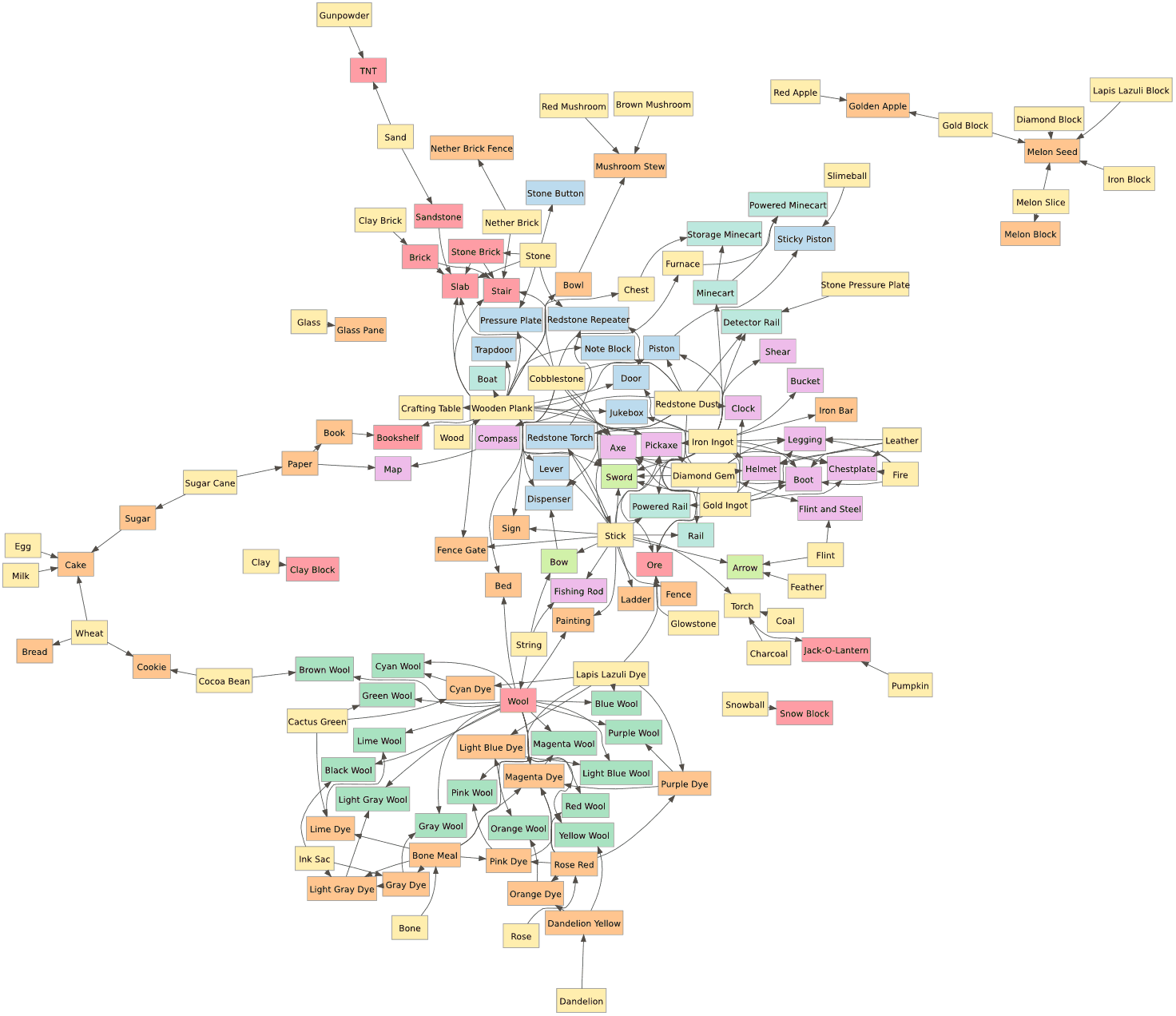
I either want to look forwards from the materials I currently have or I want to look backwards from the items I want to make. Games typically give me a UI that only shows a single step forwards. They can’t show the entire crafting graph because it’s typically too complex.
I’d like better ways to interact with the crafting graph:
- In games with a complex crafting graph, help me explore it in the game so I don’t need to use a wiki to find the information.
- In games where I’m discovering crafting recipes, help me track what I’ve learned and what I’m missing.
- In games where I’m able to pick which materials to find, help me track goals like “make Hero’s Hat” that translate into subgoals like “find 9 seeds from the Jungle”.
- In games where I’m unable to pick which materials to find, consider adjusting the loot drop rates to favor materials that would be useful for the goals I’ve set.
In the good old days, RPGs didn’t explicitly track the map or quests for you. Instead, you did it yourself, on paper. These days, RPGs have removed much of the mundane aspects of tracking things by automatically remembering things for you. There are nifty interfaces for maps, skill/tech trees, quests, subquests, lore, and so on. I’d like to see that sort of thinking applied to crafting.
Labels: ideas
Polygon map generation, part 3 #
In the previous blog posts (part 1 and part 2), I described generating random polygonal maps with elevation, moisture, biomes, and rivers. For some games, those maps are sufficient. However, in other games I want to hide the polygon structure. In this blog post I'll describe how to render the polygons into a game map that doesn't look polygonal, and conclude with the demo and source code.
The full article is here. There's also a demo and source code.
Noisy Edges
Recall from earlier that there are two graphs: one for Voronoi
corners (1, 2 in the diagram below) and edges (blue lines), and
one for polycon centers (A, B) and Delaunay edges (red
lines) between them:

I wanted to add some “noise” to the the straight lines. I tried making them move randomly, but sometimes lines would cross, and I realized I needed to constrain them so that they would never cross each other. The second thing I wanted was to make sure that the lines had as much space to wander as possible.
I realized that points A, 1, B, and 2 form a quadrilateral, and
I could constrain the wanderings of the line segment to that quadrilateral:

I further divided the quadrilateral into four quadrilaterals. Two were usable for the red (Delaunay) edge and two for the blue (Voronoi) edge. As long as the lines stayed within their allocated space and met in the center, they'd never cross each other. That takes care of constraining them.
The entire map can be divided up into these quadrilateral regions, with no space left over:

That ensures that the noisy lines aren't constrained any more than necessary. (I wonder if these quadrilaterals would be useful for game mechanics.)
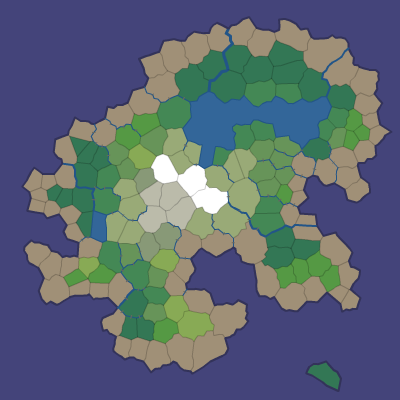
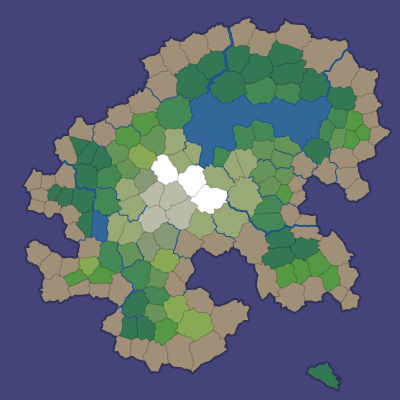
I can use any noisy line algorithm that fits within these constraints. I decided to subdivide the quadrilaterals recursively and stitch line segments together within the small quadrilaterals into a complete edge. The result is here:

The noisiness is tunable, and I have examples at segment size 7, segment size 4, and segment size 1. In the map demo I use segment size 1 for rivers and coastlines, 3 where biomes meet, and 10 elsewhere.

More noise
I'm generally a fan of noise in game art, and wanted to add a little bit of noise to these maps as well. In a real game map the noise might reflect vegetation or small variations in terrain. In the demo I just filled the screen with a random noise texture, and smoothed the colors between adjacent polygons:

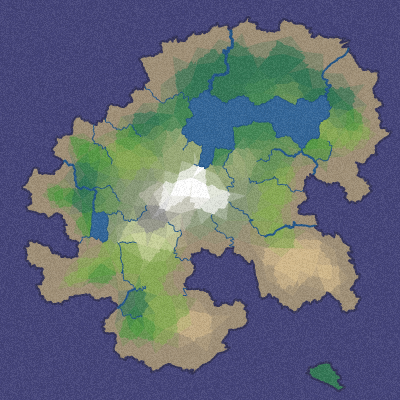
However, with a bit more random noise, we can generate this (described in the full article):

Here's a rendering with 16,000 polygons, noisy edges, a noise texture overlay, and simple lighting:

Demo
I wrote a Flash demo to explore the generated maps:

The simplest way to explore the maps is to click Random and the various View options.
In a shape number like 85882-3, 85882 chooses the overall island
shape and 3 is the random number seed for the details (random points,
noisy edges, rivers, lava). You can type in a shape number and press
Return to generate that map. The demo also shows some unfinished
features that may be useful for some games: lava, roads, and
watersheds.
Source
I've placed the Actionscript source under the MIT license; it's available on github. There's an overview page describing what's in these blog posts, along with notes about the code. I don't expect that the code will be immediately useful to anyone, but it might be a useful starting point if you'd like to use these techniques for making your own game maps. The diagrams are built with 300 polygons, the demo uses 2000, and the code can go much higher, although I've not tried above 16,000.
If you find the ideas or code useful, I'd love to hear about it!
Update: [2010-09-22] I added a noisier rendering, which is described in the full article.
Polygon map generation, part 2 #
In the previous blog post I described creating polygon island maps. Given random points, Voronoi diagrams with Lloyd relaxation produce a nice set of polygons. The polygons, their edges, and their corners can be represented as two related graphs. Given a random shape, those polygons can be marked as land, ocean, or lake. In this blog post I'll describe how to add elevation, rivers, moisture, and biomes to make the maps interesting.
The full article is here. There's also a demo and source code.
Elevation
The most realistic approach would have been to define elevation first, and then define the coastline to be where the elevation reaches sea level. Instead, I'm starting with the goal, which is a good coastline, and working backwards from there. I set elevation to be the distance from the coast. I originally tried elevations at polygon centers but setting elevations at corners worked out better. Corner-to-corner edges can serve as ridges and valleys. After calculating the elevation of corners, the polygon elevation is the average of the elevation at the corners.
Water polygons don't count towards the distance. This is both because I expect lakes to be flat instead of sloped, and because this tends to build valleys around lakes, which helps guide rivers towards lakes.

One problem with the simple definition is that some islands have too many mountains and others have too few. To fix this, I redistribute the elevations to match a desired distribution, which has more low elevation land (coastline) than high elevation land (mountains).
Elevations always increase from the coast to the mountains. That means that for any location, going downhill will eventually lead to the ocean. This diagram shows the steepest downhill direction from every corner:

By following the downhill arrows from any location, we eventually reach the ocean. This will be useful for rivers but may also be useful for calculating watersheds and other features.
I had two main goals for elevation:
- Biome types: high elevations get snow, rock, tundra; medium elevations get shrubs, deserts, forests, and grassland; low elevations get rain forests, grassland, and beaches.
- Rivers flow from high elevations down to the coast. Having elevations that always increase away from the coast means that there's no local minima that complicate river generation.
In addition, games may define their own use of elevation data. For example, Realm of the Mad God uses elevation to distribute monsters.
Rivers
Rivers and lakes are the two fresh water features I wanted. The most realistic approach would be to define moisture with wind, clouds, humidity, and rainfall, and then define the rivers and lakes based on where it rains. Instead, I'm starting with the goal, which is good rivers, and working backwards from there.
The island shape determines which areas are water and which are land. Lakes are water polygons that aren't oceans.
Rivers use the downhill directions shown earlier. I choose random corner locations in the mountains, and then follow a path down to the ocean. The rivers flow from corner to corner:

I tried both polygon centers and corners, but found that the corner graph made for much nicer looking rivers. Also, by keeping lakes flat, elevation tends to be lower near lakes, so rivers naturally flow into and out of lakes. Multiple rivers can share the lower portion of their path, but once they join, they never diverge, so tributary formation comes for free. It's simple and seems to work pretty well.
Moisture
Since I'm working backwards, I don't need moisture to form rivers. However, moisture would be useful for defining biomes (deserts, swamps, forests, etc.). Since rivers and lakes should form in areas with high moisture, I defined moisture based on distance from fresh water:

As with elevation, I redistribute moisture to match a desired distribution. In this case, I want roughly equal numbers of dry and wet regions. In this map generator, moisture is only used for biomes. However, games may find other uses for the moisture data. For example, Realm of the Mad God uses moisture and elevation to distribute vegetation.
Biomes
Together, elevation and moisture provide a good amount of variety to define biome types. I use elevation as a proxy for temperature. Biomes first depend on whether it's water or land:
- Ocean is any water polygon connected to the map border
-
Lake is any water polygon not connected to the map border
- Ice lake if the lake is at high elevation (low temperature)
- Marsh if it's at low elevation
- Beach is any land polygon next to an ocean
For all land polygons, I started with the Whittaker diagram and adapted it to my needs:
| Elevation | Moisture | |||||
|---|---|---|---|---|---|---|
| Wet | Dry | |||||
| High | Snow | Tundra | Bare rock | Scorched | ||
| Medium-high | Taiga | Shrubland | Temperate desert | |||
| Medium-low | Temperate rain forest | Temperate deciduous forest | Grassland | Temperate desert | ||
| Low | Tropical rain forest | Tropical seasonal forest | Grassland | Subtropical desert | ||
Here's the result:

These biomes look good in the map generation demo, but each game will have its own needs. Realm of the Mad God for example ignores these biomes and uses its own (based on elevation and moisture).
In the last blog post I'll describe how I get from this biome map to maps like this: (or even this!)
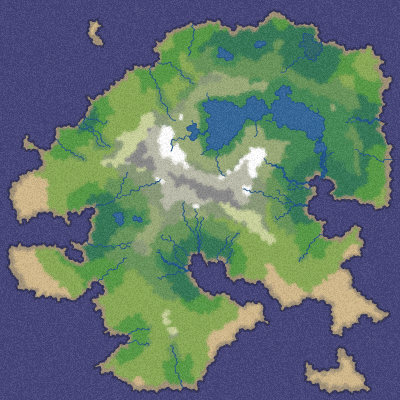
Update: [2010-09-22] I replaced the last diagram on this page with what I originally wanted but didn't finish in time for the blog post. At the time of posting, I used this image instead.