Transport Tycoon: modular airports #
I have been playing Transport Tycoon for a long time. It's my all-time favorite game. TTDPatch is a very impressive set of patches for the game, adding lots of new features that seem like they would be impossible to implement in a patch, especially by authors who don't have access to the source code. Open Transport Tycoon is an open source port/recreation of the game, and it's what I've been playing lately.
In Transport Tycoon your goal is to build a transportation empire using buses, trucks, trains, airplanes, and ships. The part I find the most fun is laying out tracks, railroad stations, and train signals. I think most of the players spend most of their time on railroads for this reason. I think I would enjoy the airplane and ship parts of the game more if I had some control over layout. All you can build right now is 6 predefined rectangular airports and 1 ship dock.
For several years on the Open Transport Tycoon forums, there's been talk of “modular” airports that would allow players to place hangars, runways, taxiways, and gates to build their own airport. However, airports are implemented with finite state machines that carefully manage multiple airplanes in holding patterns, landing, taking off, taxiing, going to hangars, and stopping at gates. Richk67 has created an impressive patch for custom non-rectangular airports. However his experience has been that the finite state machines are just too complex for players, and his patch is instead aimed at people making addons. Pikka has an alternate proposal, but take a look at the example state machine code for the simple airport. That's way too complex to make players deal with. There have been others who have argued that it should be possible to let players do this, if the GUI was good enough. However, Richk67 actually wrote some code and implemented custom airports, whereas most of the posters are just talking about proposals or ideas, so I generally believe him when he says that the finite state machines are too complex for most players.
My hope however was that there would be a completely different
approach to airports that wouldn't involve the complex finite state
machines. Playing with path based
signals, a new feature
in OpenTTD 0.7.0, has made me more optimistic. With the signals in the
original Transport Tycoon, a train made a decision when it reached a
junction with signals. The third party patches added new kinds of
signals, including allowing complex logic in TTDPatch. Path-based
signals work quite differently. Trains reserve tracks ahead of them
and only proceed if they can make a reservation. Can we apply the same
idea to airports? Instead of following a fixed state machine, we might
be able to reserve space ahead of the airplane (landing flight space,
takeoff flight space, runways, taxiways). I had only just started
thinking about this problem when I came across Dimme's
demo of a
proposed player-created airport system using airplanes reserving space
they want to use. In the demo (a Java app), you can place gate,
runway, taxiway, and other tiles to build an airport, and then run a
simulation to see how the airplanes use it. It's quite impressive!
(Note: I couldn't get the jar file to run on the Mac so I had to
recompile it myself, but it ran fine.)

A station I made with Dimme's demo
Dimme's demo shows that there's a different way to build airports that may not lead to the same complexity as the finite state machines. MarkyParky, who works with airports in real life, has good things to say about Dimme's demo, but also talks about holding patterns, which turn out to be more complicated than I imagined. I don't think that realistic holding patterns are necessary but it's something to think about. In any case, I don't think any of the discussions are going to go anywhere. Richk67's patch is the only code I saw, and as far as I can tell, the main developers have rejected his patch. Dimme demonstrated an alternate approach but there's no proposal for how to make it work within the OpenTTD code.
Dimme's demo is good. It's simple to use, it demonstrates the idea, and it lets you actually try building an airport to see how it works. After playing with it, I decided I wouldn't build an airport building demo. I think my ideas aren't different enough to make it worth it. However, his demo reminded me that I should be building more demos of ideas I want to explore. Coming up with ideas doesn't teach me as much as trying them out.
Update: [2012-08-18] There's a modular airport mod for Cities XL.
Update: [2019] It's ten years later and we now have some airport simulation games! Check out SimAirport and Airport CEO.
Labels: ideas
Animating stick figures #
For about 15 years now I've wanted to do something with stick figures. I never knew what. I just wanted to try animating them. The games I like tend to be isometric or top-down views; I generally don't like first person or side views. As a result, stick figure animation just never seemed useful enough to put into one of my games.
While reading Scott McCloud's books about comics a few years ago, I had an idea blending comic books and games, and it just happens to be a good fit for stick figure animation. I'm not sure I want to pursue it, but since I had spent so much time on the spaceship physics and editor, I thought it'd be a good break for me to take a break and take a look at stick figure animation. If it turns out to be fun I might explore the comic book idea a bit more.
The other thing that I've been wanting to explore is the ninja side of the pirates vs. ninjas theme. Sure, we have Ask a Ninja, but overall I think the pirates have gotten far too much attention. There are several pirate-themed games, like Sid Meier's Pirates, Puzzle Pirates, and Tropico 2 Pirate Cove, but not so many for ninjas. Talk Like a Pirate Day gets plenty of attention but the equivalent for ninjas just doesn't compare. Only the Somali pirate attacks are hurting the pirate image. So if I write a stick figure animation game, the protagonist will be a ninja fighting the evil pirates.
How am I going to make my 2D ninja stick figure move? There are are lots of approaches to character animation: forward kinematics, inverse kinematics, physical simulation, “ragdoll” physics, motion capture, etc. My goal was to make something simple and reasonable without putting in much artwork (motion capture or hand-drawn animation). My hope was that a 2D stick figure would take much less effort than the full 3D motion systems.
I wanted to try the simplest approach first, using basic geometry to move the legs. The hip and knee angles tell me where the ankle will end up. If I know where I want the ankle to be, I should be able to find the hip and knee angles. I tried approaching it as a gradient function, using hill-climbing to reach the solution, but it turns out this is overkill if you only have two angles. The femur and tibia length are known, and I know the distance between the hip and my desired ankle position. That means we know the three sides of the triangle, and can use the law of cosines to determine the angles. Simple. Ankles and wrists work out pretty nicely.
The next step was to make the figure take a step (pun intended, sorry!). I looked at some animator pages about the walk cycle I also read lots of papers about walking mechanics, including some about automatically “learning” how to walk. Along the way I discovered something cool: passive walking dynamics (see animation here), which treats walking as an inverted pendulum (your body over the supporting leg) and a normal pendulum (your free leg swinging freely). It seems to be a pretty good approximation of how people walk.
I decided the simplest thing would be to make the target ankle position follow a circle, as if you were on a bicycle, and then have the ground prevent your foot from going down. This actually looked reasonable, but the “liftoff” and “landing” of the foot didn't look right. To make them look better, I added transitions (see this page) that used the toe as a pivot point (for liftoff) and the heel as a pivot point (for landing). This definitely looked better, but the liftoff and landing have the ankle moving in circular arcs, and these don't smoothly transition into the overall circular motion. I improved it a bit more by making the ankle follow a spline that matched the arcs.
I was pretty happy with the walking animation, but several friends reminded me that in a ninja game, you're not going to spend much time seeing the ninja walk. The ninja will run, sneak, jump, kick, punch, throw stars, duck, swing, hide, and do flips, but walking? How boring. So once again I realized that I had been focusing on the wrong problem. The second thing was that my test app had a giant ninja, but in the game it'd look tiny, so all the little details like the flexing foot, the bounce in his step, or the liftoff and landing (which would be only a pixel high) really don't matter. [Edit 2008-05-13: changed “pirate” to “ninja”; thanks Anonymous for pointing out my error.]

I'm not sure where I want to go with this. The walking research papers were cool, but I didn't find research papers about gravity-defying ninja backflips. My gut tells me that the ninja doesn't obey the laws of physics, and thus I should stick to the geometrical approach instead of using a physics engine. Box2D looks pretty neat, and I'm sure I can use physics for other things in the game. But I need to first figure out how I'm going to implement ninja moves. Do I want to procedurally generate them somehow, or do I want to hand-pick the key frames? It'd be cool to generate them in a way that could take into account everything in the scene. For example, a jump kick should be able to jump on the box before jumping for the kick. But I suspect that's a lot more work than I want to tackle right now, and unless it's a key part of the game (if I end up writing a game), it's just not that important.
That brings up the question: what is the goal here? Am I doing this to satisfy my long-time dream of animating stick figures, or should I try to write a little game that can show off the comic book idea, or do I really want to write a game?
I don't know yet. So that leaves me at: I still want to do something with animated stick figures, and I still don't know what. But if I ever figure it out, I have now learned some things that might come in handy.
Labels: ideas
Flash 9 triangle gradients #
Flash 9 offers the beginGradientFill() method for drawing N-color 1D linear and radial gradients. However, I couldn't find a way to draw 3-color 2D gradients as seen in OpenGL.
I could compute the gradient myself and just set pixel values in a BitmapData, and then render those pixels to make my triangle. But that's no fun. It turns out BitmapData objects support lots of interesting operations like add, multiply, subtract, and even a limited form of lookup.
By incredible coincidence, triangles have three vertices and colors have three components. So you can use colors to store information about vertices. (Note that in the 3D DirectX/OpenGL shader world we do something similar by storing normal maps in color channels.) Here's what I came up with:
- Make a triangle bitmap where the red, green, and blue components of the color correspond to the barycentric coordinates of that point in the triangle, scaled to 0–255 instead of 0–1. I only have to do this once.
- Make a gradient array for the three colors I want at the vertices. The gradient array is 256 elements and it's merely the red, green, and blue values scaled down. At position i I'll store the color scaled to i/255 brightness.
- Use
BitmapData.paletteMap()to map the red, green, and blue components to the scaled colors in my three gradient arrays. ThepaletteMap()function adds the color values in those arrays to produce the final color.
This is what the triangle bitmap looks like. The red, green, and blue channels represent the barycentric coordinates:

The way this technique works is that paletteMap() calculates the output color at each pixel to be array1[red] + array2[green] + array3[blue], where the indices are the color components from the input array. In the input array, red+blue+green equals 255, and the three arrays have the color scaled up to 255. So this gives me interpolation between any three colors. For example, if red is 20, green is 80, and blue is 155, then the final color is array1[20] + array2[80] + array3[155] = (20/255*color1) + (80/255*color2) + (155/255*color3), which is the interpolation we want. Here's an example of what happens when we apply this to a triangle with green, purple, and yellow vertices:

I should also note that paletteMap() can take four arrays instead of three; the fourth is alpha. I tried building an Alpha+RGB quad bitmap for mapping, and then using four colors with that. Unfortunately I couldn't get it to work. I think paletteMap() uses alpha both for the map and for the blending (this is undocumented). Or maybe it's doing something else I don't understand. In any case I gave up on it.
The big downside of this technique is that you have to fill those arrays each time. In general, this could get expensive. If the triangles are small, it'd be faster to directly compute the interpolation per pixel (the "not fun" technique I mentioned at the top). However, in some situations you only need a few colors, and can precompute those gradient arrays. A friend of mine wants to use this for lighting calculations, and for white lights you can precompute all 255 light levels. I was hoping to use gradients to render a map (like the one in the spaceship editor demo), and if my maps contain only a few terrain types (grass, sand, etc.), I can precompute all my gradient arrays. I can use this technique to compute a color gradient bitmap, and then mix with those with my terrain textures using the standard blend operations.
Eventually I'll be using Flash 10, and that'll open up new techniques, especially with shaders. But for now, I'm using Flash 9 for my site, and I'll try to push BitmapData to do some things it probably wasn't meant to do.
Labels: flash
Game Component: Spaceship editor, part 4 #
Last year I decided that I just don't have the time and energy to work on a full game, and instead I should work on quick prototypes instead. I had planned to try an idea every few weeks. The space station generator was one of these; the spaceship editor was another. Spaceship physics turned out to be really interesting and I kept working on it. It's been months now. I have lots of other things I want to try, so I need to wrap this up, even if there's more I could do.
In the last post I talked about the physics. The final step was to figure out whether there were interesting tradeoffs that a player could make when designing a ship. I needed a spaceship editor.

I made a circle that could be dragged around with Flash's built-in draggable object feature, but I switched to handling the mouse events myself, so that I could add "snap to angle" and other constraints. It wasn't long after having a draggable circle that I made a circle for each thruster. And then two, one for the head and one for the tail. I also wanted the thruster to move as a whole if you dragged the base, but only the tip to move if you dragged the end. I overlaid these on a large version of the ship to make a ship editor. Now I could start answering the key question: are there interesting design choices?
After playing around with lots of configurations my answer was no. It's always better to put the forward thrusters near the wingtips. You don't lose any forward thrust, and you gain a great deal of rotational speed. The other thrusters were less of an issue, because they were used for less common motions.
To make this interesting I need some disadvantage of putting forward thrusters at the tips. One thing I considered was that thrusters at the edges of your ship are more vulnerable to damage. However, I don't actually have a game here, so that's not something I can easily test. So I turned to the other idea: thrusters require support that have mass. Putting a thruster far from the center requires more massive supports, which slow you down. I started with mass and moment of inertia calculations from physics, and then used tuning and experimentation to come up with something that felt reasonable. The main tradeoff I focused on is between rotational and forward acceleration, when both are from the same forward thrusters. If you move the thrusters near the wingtips, you get lots of rotation, but you need a lot of mass for the structural supports, and that slows your forward acceleration. This plot shows acceleration versus thruster distance from the center:

It shows that at least for the forward thrusters, there's a nice tradeoff between rotational and forward acceleration, and you can't get unlimited rotational power because the supports become too massive. There are lots of other things I could look at, but I think some tradeoffs depend on the game (for example, they may be completely different if the ship is in an atmosphere than if it were in space), and I'm not writing a game right now.
I eventually recognized that I could keep working on this for a long time, but I need to move on and explore other topics. I've mostly answered the question I set out to answer: if you let the player design the spaceship, are there interesting tradeoffs arising from the physics? I think the answer is yes, but probably not as many interesting tradeoffs as Spore's approach would allow. In addition, things weren't automatically interesting; I had to design a tradeoff and then tune the physics to make that tradeoff show up, and I had to be careful to avoid overpowered ships. That was unsatisfying. In a real game I imagine I'd have to manually design lots of tradeoffs for different game levels or areas of the world, and it'd be quite tough to test all the combinations. And even if I could do that, controlling sliders in a continuous tradeoff space seems less fun than picking from some really interesting manually designed items in Spore or Ur-Quan Masters. So yes, I was able to make what I set out to make, and it was fun to play with, but probably would be a lot less work and more fun to give people a few interesting choices.
The Demo
Of course after all that I should let you try designing your own ships and see what you think. Instructions:
Press T to change ships (you may have to click on the map first to get focus). The demo ships are: yellow square (4 thrusters), green square (like yellow but you can make it asymmetric), teal curved, purple curved (like teal but two thrusters are broken, so it can't fly properly), blue square (8 thrusters!), red triangle (goes fast but can't turn well). I mostly play with the yellow and blue ships.
Change the ship by dragging the thrusters and adjusting their size and orientation. As you do this, watch the graphs. The bar charts show what happens if you press one key at a time. The polygons represent your current flight envelope for two keys at a time. I find that I use the W+A and W+D combinations often, so I watch the chart in the lower left. The shaded ovals show the "target" that you want to mostly cover if you want a reasonable ship. The yellow and blue ships are easy to improve: just increase the power of the thrusters and they will fly well. The teal and red ships are slightly harder, and the purple ship is near hopeless. In a real game the number and power of your thrusters would be limited, and fuel efficiency and fuel tank size would be additional factors to consider.
Fly the ship around with W=forwards, S=backwards, A=rotate left, D=rotate right, Q=slide left, E=slide right, Z=reset position.

Try the demo.
The demo is written with Flash 10 in mind. It should work with Flash 9 but there may be some visual artifacts (due to bugs in Flash 9 that I didn't work around). There are some other minor bugs that I might fix someday.
I'm finished with the spaceship editor mini-project and haven't decided what the next mini-project will be. I really enjoyed working on the spaceship physics and editor, but I spent too much time on it, and hope to spend less time on the next mini-project.
Update: [2009-12-05] If you want to try a game that lets you create your own spaceships, check out Captain Forever. It's pretty neat.
Update: [2012-08-16] Another game that lets you design your own spaceships is Gimbal.
Update: [2012-10-15] Also see Evolving Spaceship Designs for Optimal Control and the Emergence of Interesting Behaviour [PDF], by Samuel A. Roberts and Simon M. Lucas, or watch the video.
Update: [2017-01-05] Another game that lets you design your own spaceships is Reassembly.
Update: [2019-09-17] Check out Cosmoteer, which lets you construct your own spaceships, and then the crew automatically figures out which thrusters to fire to go in the desired direction.
Game Component: Spaceship editor, part 3 #
I've been trying out a few ideas with quick & dirty demos to see if they're at all promising as part of a game. Two posts ago I talked about a spaceship editor, where you could place the thrusters, and the “AI” would learn how to pick thrusters that most closely matched your desired motion. In the last post I spent some time describing how I spent some time trying to figure out the characteristics of the ship, how I learned more about the problem I needed to solve, and some of the things I tried to find a “nice” solution to the math. I was really happy with the things I had worked on. However…
The real questions I wanted to answer were:
- Is it actually fun to fly a ship with this physics model?
- Is it actually fun to design a ship? In other words, are there interesting designs and tradeoffs?
Somewhere during the process I realized that getting the “nice” solution wasn't that important, and I had probably spent too much time on it. (Reading this article reminds me that I get distracted too easily on fun problems and I have trouble completing things.) I wasn't getting closer to answering the important questions. Instead, I was having fun learning some math that I had forgotten 15 years ago. Having fun learning math isn't bad; it's just not the main goal.

To answer the first question, I spent some time in various ships just flying around. My conclusion was yes, it's fun to fly around in a world by itself, but no, it doesn't seem like it'd be fun in an actual game, where there are other things to do. And that's when it hit me: all that time I spent thinking about the math might have been a waste of time (except that it was a lot of fun to learn some math); I should first make sure I can make the ships fun to fly.
I flew around a lot and thought about what bugged me. The main problem was that inertia was fun at first but it seemed to get annoying after a little while. For example, if I'm moving forwards with W, and then I rotate left with A, I'm still moving, but my jets are pointed at an angle. To stop moving you need to use a combination of S and Q. Even worse, since it's a keyboard instead of an analog controller, you can't hit the right mix of the two to make yourself stop.
In addition, it wasn't clear to me whether the controls should set acceleration, velocity, or target position. Acceleration was the most natural thing, and that's what I started with. But that means when you hit any key, you start out slow, then go faster and faster, until it's out of control. That might be realistic but it's not much fun. I switched it to setting velocity. But what velocity should I target? I arbitrarily chose some multiple K of the acceleration, so that after K time you'd reach that velocity.
I also needed to do more tuning. The mass, moment of inertia, friction, and rotation/translation tradeoffs are set arbitrarily. I had tried adjusting this but none of the parameters were quite right, and every time I changed the physics it got worse, and I had to tune to make it better again.
I tried to answer the second question (whether there are interesting ship tradeoffs) by creating several ships. Based on that experience, my answer is maybe. The ships I made are noticeably different but I have a clear favorite. If there's only one best ship then the ship editor's not going to be interesting. The problem is that the answer to the second question depends on what I do with the physics.
So I decided to work on the physics first.
I tried tackling inertia directly, with some ideas from a friend:
Inertia in World Coordinates gives me realistic physics for flying ships. This is what I had started with, and this is what I was unhappy with. When you're going north, and turn left, you keep flying north. The inertia keeps moving you north, even if you face west.
Inertia in Ship Coordinates gives me something that behaves more like a vehicle on wheels. When you're going north, and turn left, you start going west. The inertia keeps moving you forwards, whatever direction that may be.
No Inertia would mean that you only move when thrusters are fired. This is the most extreme change but if inertia is really a problem then it's worth a try.
I also tried treating rotation differently from x and y, because rotation seems to lead to some of the situations that make the ship less fun to control.

It was only after playing with the various options that I learned that I do really want inertia in world coordinates. Sometimes I just have to try something to help me learn something (also see this blog post). Having no inertia, or inertia in ship coordinates, just didn't feel fun to fly at all, and that's not what I would've predicted. I had the right form of inertia; something else was wrong.
After all the testing, I realized I wanted inertia but not the full effect. At low speeds, inertia is great, but at high speeds, inertia is less fun. With inertia alone it takes as long to speed up as it does to slow down again. It's okay if it takes a second or two to reach a high speed. But when I let go of the keys I want the ship to come to a stop pretty quickly. I added a force to slow the ship down. I tried three approaches:
Constant force decreases velocity V by up to K. This can be interpreted as surface friction.
Linear force decreases velocity V by K*V. I don't know what this might correspond to in physics, but in the calculations it corresponds to “reducing” inertia.
Quadratic force decreases velocity V by K*V*V. This can be interpreted as air resistance.
All three of them helped. After trying and tuning the three I decided that the linear force reduction was the most pleasant, but still not ideal. With quadratic, the problem I ran into (which I might have predicted if I were smarter) was that you can't increase your maximum velocity much if you add thrusters. Instead, it was largely determined by the air resistance. That would be fine if I were creating just one ship, but for the ship editor to be interesting, I need the number and power of the thrusters to actually matter! Constant friction left too much of your motion determined by inertia at higher speeds. The linear slowdown felt the best. I can't justify it if I were going for realism, but I'm going for fun, not realism.
I think flying the ship can be made fun. The next question to tackle is whether there are interesting tradeoffs in ship design.
Game Component: Spaceship editor, part 2 #
In the last post, I described a fun problem I wanted to play with, and my initial attempt to solve it. I made several ships, figured out how their thrusters worked, and built a simple system for flying. The keys were W for forwards, S for backwards, Q for slide left, E for slide right, A for rotate left, and D for rotate right. Once I flew them around and saw that it was fun, and ship design might be interesting for the player, I wanted to understand better the characteristics of the ships. So I did something that often helps me: visualize the data.
In this diagram you can see the black dots are the possible outputs for the first test ship, viewed from three different perspectives. You can see that it's not completely random. There's a definite shape there. The variety of shapes is what makes this problem interesting. I plotted these for all of my test ships, and learned a lot. For example, look at the lower left plot (with the A–D + W–S axes). From it we can learn that the ship flies forwards quickly (W) but backwards slowly (S). It can rotate left (A) and right (D) slowly. Going forwards makes it easier to rotate quickly; going backwards makes it harder.

While flying the ship I noticed however that there was a second problem I hadn't appreciated at first. When choosing outputs that are “close” to the desired output, a difference of +3 to +4 is nowhere near as significant as a difference of 0 to +0.1. When the player wants zero movement, it's very important to keep it zero. If one key is pressed down, then there should be one non-zero in the output; if two keys are pressed then there should be two non-zeros. The most common case for the random input/output pairs is to have no zeros, but the most common case for the player is to be pressing just one key, and thus needing two zeros!
Because my random input/output approach was fun but didn't handle the one and two-keystroke cases well, I also looked a few different analytical approaches to compute the reverse mapping directly. I looked at the pseudo-inverse operation, which is like matrix inverse but works with non-square matrices. However, it didn't look like it would help me. I also looked at it as a linear programming optimization problem. That approach looked promising but the Simplex algorithm was more than I wanted to implement.
None of the mathematical approaches I saw directly matched the problem I was trying to solve. It's easy to add the constraint about zeros to a linear programming problem but not to the matrix pseudo-inverse. It might be made to work with the random input/output pairs, by adding some weights to the output components, but the outputs generated from random inputs almost never contained zeros, so I'm never going to get exactly what I want.
One of my habits that seems to work well for me is to alternate between working things out on paper and writing code. The ship thruster physics, the input/output pairs, and the matrix math I first worked on paper, then implemented it. So I went back to paper and pen for this problem. Can I increase the number of outputs that contain some zeros?
First I tried changing the way I picked random inputs, and favored 0 and 1 instead of evenly uniformly choosing any number between 0 and 1. That didn't help much (but I later had an insight related to this change, so maybe it was useful after all). I decided I needed to attack the problem directly. The idea of interpolating between output points was still in my head, and I used that here. If I picked two points on opposite sides of a zero plane, I could find some interpolation that was on the plane. I took pairs of the random input/output pairs and solved for any zeros on the line between them. This worked well! I now had a new set of points that had one zero in the output. By applying the algorithm again, I could find a set of outputs that had two zeros.
In this diagram you can see the black dots are the random outputs projected down to the three planes, and also the white dots, which are formed from finding the point in between two black dots that intersects the plane. The space covered by white dots is more limited than that for black dots. That's because there are some wild movements that can't be controlled if you try to restrict one of the outputs to zero.

I had up to 1000 random input/output pairs. Solving the equations for every zero plane and every pair that was on opposite sides of the plane meant I needed to solve a matrix equation around 750,000 times. It took a while but it was reasonable. Applying this again to get the outputs with two zeros would've been too slow. And I wanted this to be fast enough so that you could see the flight characteristics as you were editing the spaceship.
Have you ever noticed that you often find something or think of something only after you stop looking for it? I've noticed that this happens for me when solving problems. I had gotten stuck with the brute force technique and I needed something smarter, but I was getting nowhere. So I stopped working on the problem. A few days later, while playing a game, I had an insight that should have been obvious from the start.
All the random inputs are thruster settings from 0.0 to 1.0. We're taking matrix M and multiplying it by a vector T, which must be in a fairly small space. If there are N dimensions, T is an N-dimensional vector, and all its components are between 0.0 and 1.0. That means … the space of all valid thruster configurations is a unit N-dimensional hypercube.
A wise man once told me that it's sometimes easier to solve the general case than the specific case. I had been trying to solve the specific case, of a single input mapped to a single output. And then I'm using computational power to handle lots of them. The general case is to take the entire hypercube and transform it to the output, and see what comes out.
What comes out is a polyhedron in 3 dimensions.
This insight seemed like it came out of nowhere, while I was playing a game, killing orcs. But when I thought about it more, I think it wasn't out of nowhere. If I were smarter I would've figured it out from the very beginning, but some things I had thought touched on the hypercube approach. One clue was that when I picked random numbers for inputs, I found that it useful to bias towards 0.0 and 1.0. My experiments were guiding me towards choosing the vertices of the hypercube. Another clue was that in linear programming, you can think of the valid space as a convex polyhedron in some higher dimensional space. I had spent some time thinking about what the polyhedron represented in my problem but I wasn't able to make the connection. A third clue was that plotting the black and white dots made it look like there were simple polygons involved.
For N thrusters the hypercube has 2N vertices. In this diagram you can see the hypercube vertices, multiplied by the matrix, do cover the space that the random points covered. As before, the black dots are the random sample. The colored dots are the vertices of the hypercube.

Instead of picking lots of random points, I should pick these points. And then I can take every pair of these and find the interpolation that has a zero output. And then I can take every pair of those and find the outputs with two zeros.

I worked this out on paper. Page after page of solving equations for test ship 1, following by plotting things out on graph paper, convinced me that this was quite promising.
I was really happy with myself. I had figured out a much more elegant
solution that didn't involve random numbers.
I took the equations I solved on paper and wrote some code to solve them. I tried it out on several different ships. And then I ran into a problem. For one of my ships, with 8 thrusters, the algorithm still ran rather slowly. Why? Well, 28 is 256. Finding the one-zero outputs involved examining 215 pairs in 3 dimensions, or around 100,000 systems of equations to solve. It took a few seconds, but I hadn't gotten to the one-zero case yet, which is the really expensive one. For this ship I was almost as slow as the random point approach. The random points were slow but equally slow for all ships, whereas the hypercube vertices got worse every thruster you added. Ick. While starting a cube lamp on my desk, I realized that all the useful zeros should occur along edges, not as interpolations between two arbitrary points. I could reduce 28 pairs X 27 pairs to just 28 pairs X 8. Much faster! However, that was only the one-zero outputs. I still had to run the interpolations again, to find the two-zero outputs. And even with the optimization that was around 1,000,000 systems of equations. I was sure there was another optimization involving surfaces instead of edges but I just couldn't figure out what it was.
So I took another break. I spent some time plotting what I had, to see if there were insights I could draw from the visualization. I plotted sets of points and found that many of them just aren't relevant because they're in the “interior” of the areas. All I care about is the perimeter. To compute the perimeter in two dimensions is a well-known problem: convex hull.
I thought about how to compute a convex hull, and it seemed rather simple. I wrote down my notes, then proceeded to see what the standard algorithms were. None of them seemed as simple as my algorithm, which meant my algorithm probably has a bug. But I couldn't see what it was, so I decided to let it wait a bit. A few days later, still unable to think of a flaw, I sketched out the math on paper, then implemented it. Although I had a few bugs in the code, the algorithm itself worked.
Once I had the convex hull algorithm available, my next step was to use it to simplify the one-zero outputs into a convex hull before finding the two-zero points.
In this diagram you can see the points that make up the convex hull. As before, the white dots are the interpolations between random points, to find positions on the zero plane. The colored points with black borders around them are the interpolations between hypercube vertices, fed into the convex hull algorithm. You can see that all the points I computed from the random set lie within the convex hull computed from the hypercube vertices.

In fact the two-zero points always occur between adjacent points in the convex hull, so I had gotten yet another optimization out of this change. However, I discovered that my convex hull algorithm does have a flaw. When there are collinear points it doesn't always remove all of them. The flaw remains in my code; it doesn't seem to be a big deal in practice, because my code is now “fast enough”. For each of the five test ships, generating the flight parameters takes less than a second.
Another thing that wasn't clear to me when I started was that when you press both W and Q, you want to go both left and forwards, but there's not a fixed ratio between the two. Sometimes you can get both and sometimes you have to make a tradeoff, and none of the techniques worked out of the box for that. I think this might be something to leave to the ship designer, once the flight characteristics are known. For example, in the above diagrams you could have a way to mark what you want a combination of keys to do.
It's been a fun journey. I've taken off some rust from my skills. And I learned a bit more about linear programming, the simplex algorithm, physics, and convex hulls.
However, I haven't yet written an editor. But I now have the physics and math worked out, so once I have an editor, you'll be able to see the flight characteristics of the ship you're editing. I'll post the demo and source here. It will be nice if there are interesting tradeoffs for the player. For example, if you put jets on the wingtips, you can rotate very quickly, but perhaps it adds a lot of mass to make the wings sturdy enough to take jets, and that extra mass slows you down in terms of forward acceleration. Once I have the editor I'll get a better feel for whether there are interesting tradeoffs to be made, and whether this would be useful to have in a game.
Game Component: Spaceship editor, part 1 #
I've been playing Spore recently. It's an interesting game. One of the criticisms is that the physical characteristics of the things you do in the editor don't make a difference to gameplay. For example, having wide legs or narrow legs or four legs or six legs doesn't affect your speed. Only the +Speed items affect speed. Only in the Cell stage does placement matter. I read some of their reasoning behind this design and I agree with it. In a game where creativity is more important than realism, simplifying that aspect of the game will encourage people to be more creative in their designs. I know that if the number of legs actually mattered for gameplay, I wouldn't have made my creature hop around on one leg.
Although I think they made the right decision for Spore, I was inspired to explore the alternative: something where the way you design your creature matters a great deal. To fit in with the 2d top-down theme I've been using (see the space station miniproject), I'm using spaceships instead of creatures.
The main idea for this miniproject is that you'd design the ship, and then the “AI” would learn how to fly the ship you designed. For example, let's consider the following ship with four thrusters:
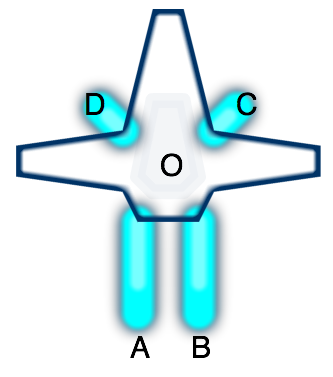
If you fire either thruster A or B, you'd end up rotating. But if you
fire both at once, you would go forwards. Given a set of thrusters
(location on the ship, direction they fire, and their maximum power),
I can calculate the effect on the ship (acceleration and rotational
acceleration). Initially I was calculating the force to be only what
was transmitted along the A→O vector, but later I realized that
because the ship is rigid, the entire force gets transmitted to the
entire ship, and is independent of the location of the thruster.
Since thruster A fires in direction (0, +2), the force on the ship is
(0, -2). Rotation is slightly trickier, as we need to calculate
torque, and take into account the rotational moment of inertia. For
now I'm assuming the mass and moment of inertia are constants, but
later I'll compute these based on the characteristics of the ship. The
torque does take into account the position of the thruster, and we
have to compute the cross product of the A→O vector (-2, 4) and the
force vector (0, -2).
The forward mapping from thrusters to forces turns out to be a matrix multiplication. Each thruster is a column and each effect on the ship is a row. Doing this for each of the thrusters, we get the thruster matrix M mapping thrusters to force and torque:
| M: | A | B | C | D |
|---|---|---|---|---|
| Fx | 0 | 0 | -0.5 | 0.5 |
| Fy | -2 | -2 | 0.5 | 0.5 |
| Tq | 10 | -10 | 1.25 | -1.25 |
Given a thruster configuration vector T, M∙T gives us the forces acting on the ship.
The real problem though is reversing that mapping. The player presses a key to move forwards, and I need to figure out which combination of thrusters best accelerates the ship forwards. What value of T leads to M*T being close to [ 0 1 0 ]?
The simplest approach is brute force. So I started with that first. I generated lots of random inputs and calculated their outputs. Then when I needed some particular output, I scanned them all and picked the input that most closely generated that output. Over multiple simulation cycles, any errors would be corrected by picking different input/output pairs. I could make this even more stable by iterating within a single simulation cycle, and interpolating among the results.
This approach worked reasonably well!
The ship behavior was interesting. My first test ship (the one I'm using for these examples) moved reasonably well forwards and backwards, and could rotate well, but it couldn't slide left and right quickly.
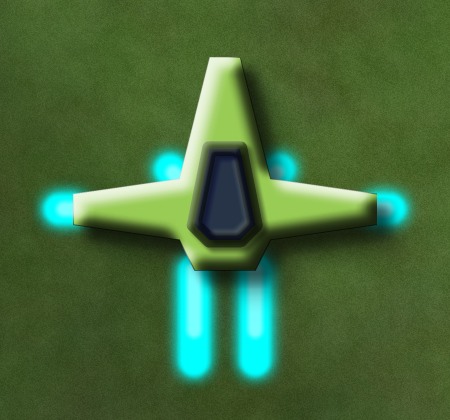
My second ship is a variant of the first. When moving forwards it can rotate well, but if you're stationary or going backwards the rotation is limited. When you fly it you'll see that if you want to rotate, you need to move forwards at the same time. Here's what it looks like:
My third ship had reasonable movement, and rather asymmetric: it could rotate and slide left at the same time, or rotate and slide right at the same time, but it was much slower if you rotated left while sliding right or vice versa. It looks a little different from the first two, but right now that makes no difference in the physics:

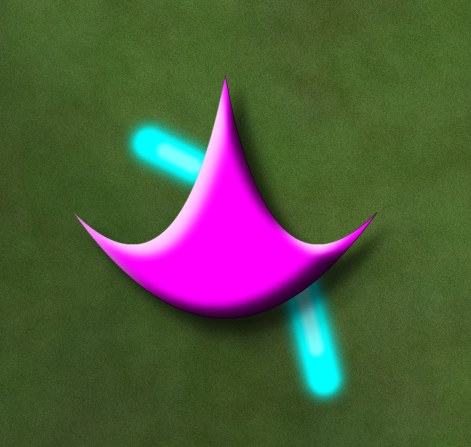
My fourth ship is a damaged version of the third ship, to see if having inoperable thrusters would make for interesting gameplay. Going forwards would also make you spin around in circles. It was fun to play with in the prototype but I'm not convinced it'd be fun in a game. You can see why it's unstable:
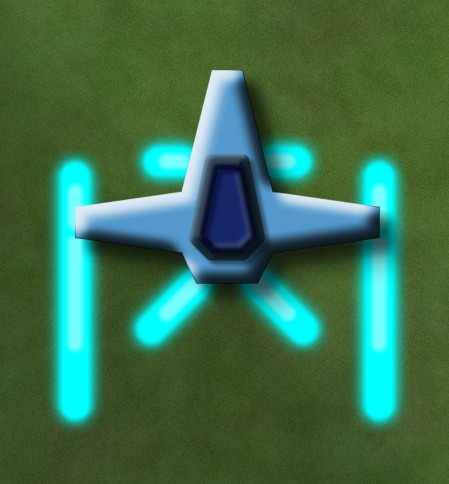
My fifth test ship could rotate very quickly but couldn't go backwards at all (at least until I fixed a bug in the physics calculations), so you'd turn around and go forwards in order to stop moving. This might be a ship you can't build until later stages of the game, when you've gained building points or parts or money. Just look at how much power it has:
At this point the prototype made me think there was something potentially fun for a game. You could design your own ship and make tradeoffs. The game “AI” would learn how to map your keys to thruster movements, and the player would then have to learn best to use the controls for navigation and combat. For example, having to turn a ship around to stop is unusual but you might design a ship that way if you could get lightning-quick rotation in return. You might design different ships for different levels. Or you might learn how to play a ship so well that you don't want to switch to something else with different characteristics.
I knew the ships were all different in their behaviors but I didn't understand what their limits were. So my next step was to try to understand the flight characteristics of the ships. That's for the next post.
Game Component: Radial Base Layout #
I haven't had the time and energy to work on a full game (the transportation game is on hold) but instead I'm playing with lots of little ideas, some of which turn into demos. This week's idea is to algorithmically generate layouts for space stations or space bases, so that they all look different. Originally I had a lot more variety in mind, but for the demo, I only implemented simple radial layouts:
I wrote some notes about the algorithm, the source code, and how to use this in a game.
Update: [2008-12-02] I forgot to mention my motivation: I was looking for something very simple that would compile to a small size and generate “programmer art”. The layout and rendering for this compiles to under 5k, and I'd guess that it could be under 3k for something more specialized. The small size and large variety makes this a reasonable thing to include in a browser-based game.
Reflexes and Brains #
The brain is a complex organ with complex processing. But it's slow. Early AIs were written to explore the highest level of brain functions — things like planning, logic, natural language, creativity, problem solving, mathematics. Like the higher levels of the brain, solving these problems is slow. In game AI, planning and pathfinding are examples of the higher level processing, and these are often slow.
In the body, when fast reactions are needed, we have reflexes: a fast but dumb reaction that occurs before the brain can fully process and respond to a signal. The classic example is putting a hand on a hot potato – you will pull your hand away before the brain even receives the pain signal. Many reflexes are handled by the spinal cord, before the signals reach the brain.
The body has both:
- A global slow, smart system: processing in the brain
- A local fast, dumb system: reflexes closer to where the input occurred
In game AI we can often do the same. An example is in games where pathfinding is slow, and has to be split up among several frames. We need to give instant feedback to the player when the unit is clicked. If pathfinding is slow, then we need something else in its place. In some games, you'll see animation and sound for the unit getting ready to move. But the reflex-inspired approach would be to have a secondary pathfinding system that's fast and dumb, and have the unit start following that path right away. The most straightforward approach would be to start moving in a straight line; another approach would be to see if any nearby units are moving to the same general area, and start following them. The slow, smart system can fix the path later. In some cases you don't need the smart system at all because the dumb path is fine. That way, you can get both instantaneous action and good paths.
In planning tasks we also have places where reflexes can be useful. For example, suppose three different squads are attacked simultaneously. Their reflex action should be to fight back. In the background a slower processing task can analyze these three positions, the size of the attacking forces, and the information gathered from scouting. It can guess what the enemy is going to do next, and order all three squads to fall back to a safer position. Fire first, then fall back, instead of waiting for the analysis before performing any action.
Lots of games already use these techniques. They're part of a general pattern: use both slow/smart and fast/dumb event handlers, so that you can react quickly and then go back and react smartly in cases where you need it.
Labels: design
Multiple clients for the same game #
When I'm interacting with my computer, there's a range of interfaces I use. On the “high” end, there are full screen specialized UIs sometimes with specialized controllers. I have a highly customized World of Warcraft interface that's tuned for the special keyboard I got for playing games. These UIs typically use your full attention, and you don't do anything else on the computer at the same time. On the “low” end, there are simple interfaces that are usually text-based and line-at-a-time. Twitter and instant messaging let me send and receive short lines of text. These UIs typically use very little attention, and sit unobtrusively on the side while you do something else.
Most games I see are on the “high” end. They have specialized interfaces that you have to learn, and you're not often multitasking. Browser based games are somewhere in the middle. They're not using up the full screen, they have simpler UIs that fit with the browser's UI, and you can have other things going on at the same time, although you'll probably ignore them if the game requires your full attention.
For some kinds of games I think it would make sense to have multiple interfaces to the same game. Outside of games, you see examples like EBay, which has a main interface (through a web browser), some “rich client” applications that you can download, and mobile phone alerts. They all access the same database. You can get more out of the rich client, but it's not something you run all the time. You do have the mobile alerts on all the time, but you can't do very much with that interface. Also look at television shows like Lost or Heroes, which have a main “rich” interface through the TV show, but also expose other aspects of the show through their web site, novels, discussion forums, comic books, and games. The Matrix series of movies had other aspects of the storyline revealed in comics, anime, and video games.
What kinds of games would benefit from multiple clients? I think it's most useful in games that have interactions with other people. In these games, things can be going on when you're not playing. A lightweight client would be useful for finding out what's going on, and perhaps inducing you to play with the full interface. You already see notification of this sort in a very simple setting: play-by-email Chess or Go. There's the game itself, and there's a lightweight communication mechanism (email) that lets you find out what's going on. But I'd like to see this in a lot more games. For example, in Halo 3, it would be nice to see if my buddies are playing online. Imagine an IM bot that showed in its status message how many buddies were online. Even better, what if you could talk to that bot to chat with your buddies in the game, and see their replies in the IM window. That way you could see what was going on, even if you're not able to play right away. And if you saw that your buddies have been playing quite a bit, you might go into the living room and boot up the XBox. Second Life, World of Warcraft, and any other game with a chat interface might benefit from having chat interoperate with an IM client.
Another kind of game I'd like to see with multiple clients is persistent world games. There are things going on in the world when you're not playing, and it'd be nice to keep track of these. For example, in my brother's game, Barren Realms Elite, you'd send attack forces out to distant worlds, and the attack would happen at some time, usually when you weren't playing. It'd be nice to have a web page or RSS feed or gadget (Mac Dashboard, Vista sidebar, etc.) that showed me the status of my attack force and the outcome of the battle. These days, MMOs are the most obvious sort of game where this would be useful. In World of Warcraft, I'd like to know that Stormwind City is under attack by 60 Horde, or that my guild just defeated the bosses of Karazhan. The state of the world could be displayed in a web page, and major attacks could be sent as IM or email or RSS alerts.
Another sort of interaction I'd like with a game is for part of the game – not just status or chat – to be accessible in a lightweight client. In EVE Online, I'd like to track the economic game – my buy and sell orders, as well as production – even when I'm not in the full game client. EBay mobile alerts likely increase people's usage of EBay; my guess is that having that lightweight client that lets you track your EVE Online business dealings would make you play EVE Online more.
Even in single player games, there are some interactions with other people. For example, suppose a new high score in Scrabulous was sent to all your Facebook pals. That'd both remind people to play Scrabulous, and it would also encourage everyone to try to beat that high score. Scrabulous is a Facebook game, but you could imagine doing the same with other games. If XBox achievements were sent to my Facebook account, it'd be more fun to get those achievements than if people saw them only when they turned on their XBox.
To summarize, I'd like to see a lot more games with multiple interfaces. Some ideas are:
- Status (web, IM status) to passively see what's going on in the game, even when I'm not there.
- Alerts (RSS, email, IM, SMS texting) to actively be notified of major events in the game.
- Chat (IM, email) to allow communication between people playing right now and people who might not play until later.
- Play (web) to allow playing some subset of the game through an interface that I can use when I'm doing other things.
For some, the lightweight game will augment the full game. Many will end up participating in only the lightweight part of the game. For others, the lightweight game will be a gateway that leads them to try and enjoy the full game. I think that's a good thing. Not everyone uses all the EBay clients; not everyone who watches Heroes reads the comic books and plays the online games; not everyone who watched The Matrix also played the game. Different people will participate in different ways. Use an interface that's simple and widely accessible to complement the interface that's rich but not there all the time. We'll have much more interesting games when lots more people participate in them.
Labels: design